The Art of Mapping Globals to Classes 1 of 3
The Art of Mapping Globals to Classes 1 of 3
Looking to breathe new life into an old MUMPS application? Follow these steps to map your existing globals to classes and expose all that beautiful data to Objects and SQL.
By following the simple steps in this article and the next two you will be able to map all but the craziest globals to Caché classes. For the crazy ones I will put up a zip file of different mappings I have collected over the years. This is NOT for new data; if you don’t already have existing global please just use the default storage.
If you still can’t make heads or tails of your globals, send some example data to Support@InterSystems.com and we will be happy to help you figure it out.
Steps for mapping a global to a class:
- Identify a repeating pattern in the global data.
- Identify what makes up a unique key.
- Identify the properties and their types.
- Define the properties in the class (don’t forget the properties from the variable subscripts).
- Defined the IdKey index.
- Define the Storage Definition:
- Define the Subscripts up to and including the IdKey.
- Define the Data section.
- Ignore the Row ID section. 99% of the time the default is what you want so let the system fill that in.
- Compile and test your class / table.
On to the example!
Say you have 2 globals that look something like this:
^mapping("Simple",1)="Brendan Bannon^55192^SQL Manager"
^mapping("Simple",2)="Nicole Aaron^63375^Support Specialist"
^mapping("Simple",3)="Kyle Baxter^61155^Senior Support Specialist"
^mapping("Simple",4)="Prasad Kari^58471^Support Specialist"
^mapping("Simple",5)="Clive Morgan^57982^Senior Support Specialist"
^index("Simple","HireDate",55192,1)=""
^index("Simple","HireDate",57982,5)=""
^index("Simple","HireDate",58471,4)=""
^index("Simple","HireDate",61155,3)=""
^index("Simple","HireDate",63375,2)=""
Let's go through the 7 steps to create a class that will let use look at this data via SQL and Objects.
Step 1
The ^mapping global is about as simple as it gets. Each node looks like it contains the same type of data. We will deal with the ^index global after we finish with the ^mapping global.
Step 2
The first subscript is just a constant. The second subscript is an incremented counter that looks to be unique for each row of data.
Step 3
Looks like the properties could be: Name, HireDate, Title. Without looking at the ^index global or having someone that knows how the data is used it would be hard to know that 55192 is a date, let alone a hire date. Don’t forget to define a property for the value in the second subscript.
Step 4
Property Name As %String;
Property HireDate As %Date;
Property Title As %String;
Property Sub2 As %Integer;
Step 5
You must define an IdKey index for every class that uses Caché SQL Storage
Index Master On Sub2 [ IdKey ];
It is not required to define an index for the index maps, but it is a good idea.
Index hireDateindex On HireDate;
Step 6
Now we need to create the mapping between the class and the global. I like the wizard so I will show the screen shots for that, but if you are good at typing xml you can define the Caché SQL Storage definition manually.
Click on the Storage icon. You can call the Storage Definition anything you want, I went with the default. Click on Caché SQL Storage and click finish.

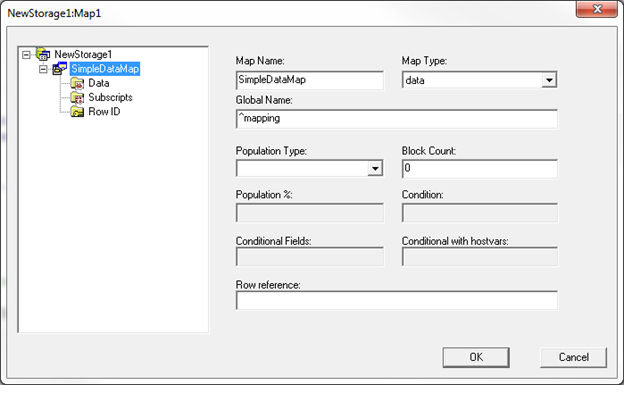
In the window below I changed the Map Name, but Map1 works as well. The only thing you need to fill in is the Global Name. Don’t forget the “^”. Every persistent class needs to have one data map. It can have multiple index maps.
Clicking OK will exit you from the wizard so stay away from that until you are all done.

Step 6a
I like to do Subscripts next. In here we are going to define all the global subscripts up to and including the IdKey (the IdKey can be more than one subscript). In the expression box you refer to a field by putting it in {}. You can put in any valid COS expression here. We are keeping it simple so we just have a constant a Subscript 1 and a field at Subscript 2.

Step 6b
For data we are describing any subscripts that come after the IdKey plus all the data to the right of the equal sign. The Node column would be used for any additional subscripts (my next post will have an example of this). Piece and Delimiter are describing the location of the properties in the global. The default is to use the $PIECE command to parse the global data.

Step 6c
Nothing to see here, I told you to leave it blank.

Now repeat step 6 for the ^index global.

Step 6a
Four subscripts this time: two constants, HireDate and the IdKey (Sub2). Every Index map must be able to construct the IdKey. Most of the time it will be in the subscripts, but it could be part of the data.

Step 6b
There are no additional subscripts and no data so this one is blank

Step 6c
Still nothing to do here.

Step 7
All that is left now is to compile the class and then try to query the table to make sure it correctly displays the data.
Compilation started on 08/15/2016 15:20:58 with qualifiers 'fck /checkuptodate=expandedonly'
Compiling class Mapping.Example1
Compiling table Mapping.Example1
Compiling routine Mapping.Example1.1
Compilation finished successfully in 0.270s.
SELECT Sub2, Name, HireDate, Title FROM Mapping.Example1
Sub2 Name HireDate Title
1 Brendan Bannon 1992-02-10 SQL Manager
2 Nicole Aaron 2014-07-07 Support Specialist
3 Kyle Baxter 2008-06-08 Senior Support Specialist
4 Prasad Kari 2001-02-01 Support Specialist
5 Clive Morgan 1999-10-01 Senior Support Specialist
And for those of you who like to type here is what the storage definition looks like in xml
/// Every class can only have 1 active Storage Definition.
/// Each Storage Definition can have more than one map.
Storage NewStorage1
{
<SQLMap name="HireDateIndex">
<ConditionalWithHostVars></ConditionalWithHostVars>
<Global>^index</Global>
<Subscript name="1">
<Expression>"Simple"</Expression>
</Subscript>
<Subscript name="2">
<Expression>"HireDate"</Expression>
</Subscript>
<Subscript name="3">
<Expression>{HireDate}</Expression>
</Subscript>
<Subscript name="4">
<Expression>{Sub2}</Expression>
</Subscript>
<Type>index</Type>
</SQLMap>
<SQLMap name="SimpleDataMap">
<Data name="HireDate">
<Delimiter>"^"</Delimiter>
<Piece>2</Piece>
</Data>
<Data name="Name">
<Delimiter>"^"</Delimiter>
<Piece>1</Piece>
</Data>
<Data name="Title">
<Delimiter>"^"</Delimiter>
<Piece>3</Piece>
</Data>
<Global>^mapping</Global>
<Subscript name="1">
<Expression>"Simple"</Expression>
</Subscript>
<Subscript name="2">
<Expression>{Sub2}</Expression>
</Subscript>
<Type>data</Type>
</SQLMap>
<StreamLocation>^Mapping.Example1S</StreamLocation>
<Type>%CacheSQLStorage</Type>
}
For those that don't want to type here is a file with the globals and class: mappingexample1.zip
If you want to learn more have a look at Part 2
Comments
Usually the variable subscripts in a global will have a name of some kind, known to the developers that wrote or support the application. The name may also be known to the users of the application. I recommend using that name for the property, such as "EmpID" or "EmployeeID" rather than something generic like "Sub2".
Hello brandon
can I ask about my globals ? I can compile after my storage
Hi Ariel
Of course you can ask. you can post here if you like or you can email me your classes: Brendan@intersystems.com
Here is the question.
I have 2 globals as shown below TBL and RMA .
They are shown here partialy ( masks were operated )
The storage is as shown .
Class is compiled sucssesfuly but no result for even the basic SQL query : SELECT *FROM TBLandRMA2 


Next time please, create new own topic as a question instead of asking in some topics.
The purpose is to join 2 tables based on VendorNum
thanks a lot
So I don't think you class would even compile. The Data map needs to have all the stored fields in it and it looks like you have something called {sub2} that is not in the Data map, it is just in the index. If it is an SQL Computed field then the class might compile.
Based on your comments it sounds like you are pretending that the ^SPMRMA global is an index when it is really the data map of a second class.
I don't think this will save you much if any in performance over writing the JOIN.
If you really want to do this I would say that ^SPMRMA should be the data map and then to get VendorName out of ^TBL you can write Retrial Code in the data section or you might be better off using compute code in the property def. In Data Retrieval code you can only use {L#} so you would need to write some code to get a {VendorNum} In compute code you would be able to reference {VentorNum}. Going in this directions you would not have an index map, just the Data Map.
While the above will work, I still don't think it is a great idea.
Thanks .
I made both of them to data map . it is still compiled - but no result
I need an information from both tables ( might be from the data / subscripts) and the connection is according
VendorNum in data (piece 1 ) in SPMRMA
and
VendorNum which is subscript3 in TBL . That is the reason I called them both VendorNum as you did in family example
the results I need is ( for example ):
VendorNum num VendorName
01001032 01001033 _Infinidat
The mapping is below , now I switched (index for TBL and data for RMA).
pls tell me which should be index and which data ( it might be even 3 globals and more ) and how to map the globals.
Can you send me more examples?
thanks
You can only have 1 data map in a class.
I strongly recommend you create 2 classes and then write a view to join them together,
Brendan
Ariel
Attached is an example of what I think is the correct way to do what you want. I have created 2 classes to map the 2 different globals and then created a third class that is a view that exposes the info from the 2 classes in the way that you want.
Brendan
 The article is considered as InterSystems Data Platform Best Practice.
I'm creating a new SQL storage:
.png)
However I don't have "Next" button enabled. And if I press "Finish" I exit the WIzard.
How do I get to this screen?
In Studio open Inspector and then Storage
Thank you!
I have a question regarding to the indexing: for me example shown in the article works fine, the index global is populated property for inserted records but then I have two problems:
- Rebuild Index just deletes the whole index global and creates nothing instead.
- Show Plan indicates that my index cannot be used directly when selecting on the indexed property. Instead, the executor has to create a temporary map applying %SQLUPPER to the property.
Any advice how to make fully compatible index?
Cache for Windows (x86-64) 2018.1.5
Could you post your code and some sample global content you try to map, please?
Here it is. InsertData properly creates both ^mytest("data") and ^mytest("idx"). Rebuild Index does nothing except deletes ^mytest("idx").
Class loggpro.IndexTest Extends%Persistent [ ClassType = persistent, ProcedureBlock, SqlCategory = INTEGER, StorageStrategy = itemstore ]
{

Property aaa;Property bbb;
Index prim On aaa [ IdKey, PrimaryKey ];
Index idxBbb On bbb;ClassMethod InsertData()
{
	for a=1:1:10 {
		s o=##class(loggpro.IndexTest).%New()
		s o.aaa=a
		s o.bbb=a+100d o.%Save()
	}
}

Storage itemstore
{
<SQLMap name="indexmap">
<Global>^mytest</Global>
<PopulationType>full</PopulationType>
<Subscript name="1">
<Expression>"idx"</Expression>
</Subscript>
<Subscript name="2">
<Expression>{bbb}</Expression>
</Subscript>
<Subscript name="3">
<Expression>{aaa}</Expression>
</Subscript>
<Type>index</Type>
</SQLMap>
<SQLMap name="itemmap">
<Data name="bbb">
<Node>"bbb"</Node>
</Data>
<Global>^mytest</Global>
<Subscript name="1">
<Expression>"data"</Expression>
</Subscript>
<Subscript name="2">
<Expression>{aaa}</Expression>
</Subscript>
<Type>data</Type>
</SQLMap>
<StreamLocation>^CacheTemp</StreamLocation>
<Type>%CacheSQLStorage</Type>
}

}
You need to provide a datatype for your properties, try with:
Property aaa As %Integer;
Property bbb As %Integer;
Enrico
I have many data mapped like this and Caché usually uses the indices.
To get Caché to use mapped indices you have different options:
- Use appropriate data types.
- It looks like the collation of your indexed data is "exact". So please use one of these options (or a combination of them) if the data type is %String:
- Property bbb as %String(COLLATION="EXACT");
- select * from loggpro.Indextest where %EXACT(bbb)=123
If all of your indexed data of type %String is collated "exact", it is usefull to subclass the %String datatype and set the COLLATION parameter there. Use the new datatype instead of %String afterwards.
Good luck!
Alex Riemer
Now all my fields are of type %Library.Integer but Rebuild Index still just deletes ^mytest("idx"). Does Rebuild Index work for you?
Yes, of course, I tested it and it works after adding the datatype.
How do you rebuild the indices?
Enrico
@Enrico Parisi
See my answer above.
Yes, we can rebuild indices by %BuildIndices(). To rebuild specific, named indices we use %PurgeIndices(<IndexList>) and %SQLBuildIndices(<IndexList>)
I think, you have to delete the index definition in the class. For SQL storage it is IMHO sufficient to have the index definition in the storage.
Just the IDKEY index has to be defined in the class.
I just loaded your sample code in my Studio and compiled it. IMHO %RebuildIndices() should just work. How do you call it?
A hint from me: We've reimplemented %PurgeIndices() as the generated version of ISC deletes the indices very ineffecient - line by line. Our version just kills the appropriate global tree. 
That's weird, ##class(loggpro.IndexTest).%BuildIndices() indeed recreates the index properly. But the way I do it, with Portal's SQL, Rebuild Index just wipes the index out. Please check how Portal works for you.
I'm lazy typing, in my test I've used the portal and it worked just fine.
What version are you using?
Enrico