Create an IRIS Interoperability Production from Swagger
Hi Community, OpenAPI-Client Gen has just released, this is an application to create an IRIS Interoperability Production client from Swagger 2.0 specification. Instead of the existing tool ^%REST that creates a server-side REST application, OpenAPI-Client Gen creates a complete REST Interoperability Production client template.
Install by ZPM:
zpm "install openapi-client-gen"
How to generate production from Swagger document? It's very simple.
Open a terminal and execute:
Set sc = ##class(dc.openapi.client.Spec).generateApp(<applicationName>, <Your Swagger 2.0 document>>)
The first argument is the target package where production classes will be generated. It must be a valid and non-existing package name.
The second one, the Swagger document. These values are accepted :
- File path.
- %DynamicObject.
- URL.
The specification must be in JSON format.
If your specification uses YAML format, It can be easily converted to JSON with online tools such as onlineyamltools.com
Example :
Set sc = ##class(dc.openapi.client.Spec).generateApp("petshop", "https://petstore.swagger.io:443/v2/swagger.json")
Write "Status : ", $SYSTEM.Status.GetOneErrorText(sc)
Take a look at the generated code, we can see a lot of classes, split into many sub-packages :
- Business Service: petshop.bs
- Business Operation : petshop.bo
- Business Process: petshop.bp
- REST Proxy application: petshop.rest
- Ens.Request and Ens.Response: petshop.msg
- Parsed input or output object: petshop.model.Definition
- Production configuration class: petshop.Production
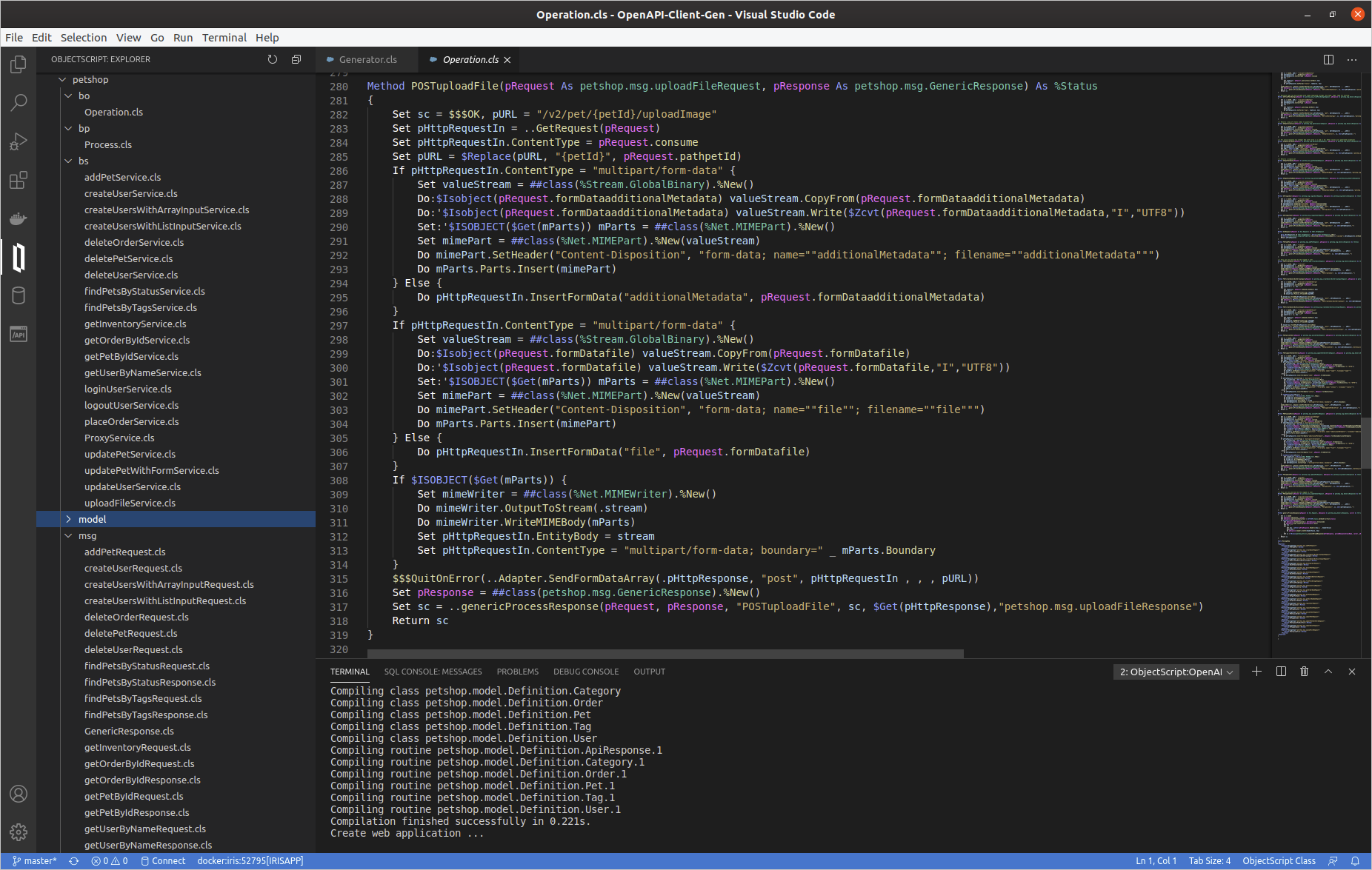
Business Operation class
For each service defined in the Swagger document, there is a related method named by <VERB><ServiceId>.
Deep dive in a simple generated method GETgetPetById
/// Returns a single pet
Method GETgetPetById(pRequest As petshop.msg.getPetByIdRequest, pResponse As petshop.msg.GenericResponse) As %Status
{
	Set sc = $$$OK, pURL = "/v2/pet/{petId}"
	Set pHttpRequestIn = ..GetRequest(pRequest)
	Set pHttpRequestIn.ContentType = pRequest.consume
	Set pURL = $Replace(pURL, "{petId}", pRequest.pathpetId)
	$$$QuitOnError(..Adapter.SendFormDataArray(.pHttpResponse, "get", pHttpRequestIn , , , pURL))
	Set pResponse = ##class(petshop.msg.GenericResponse).%New()
	Set sc = ..genericProcessResponse(pRequest, pResponse, "GETgetPetById", sc, $Get(pHttpResponse),"petshop.msg.getPetByIdResponse")
	Return sc
}
- Firstly, the %Net.HttpRequest object is ever created by the
GetRequestmethod, feel free to editfor adding some headers if needed. - Secondly, HttpRequest object's filled using pRequest `petshop.msg.getPetByIdRequest' (Ens.Request subclass).
- Thirdly,
EnsLib.HTTP.OutboundAdapteris used to send http request. - And finally there is a generic response processing by
genericProcessResponsemethod :
Method genericProcessResponse(pRequest As Ens.Request, pResponse As petshop.msg.GenericResponse, caller As %String, status As %Status, pHttpResponse As %Net.HttpResponse, parsedResponseClassName As %String) As %Status
{
	Set sc = $$$OK
	Set pResponse.operation = caller
	Set pResponse.operationStatusText = $SYSTEM.Status.GetOneErrorText(status)
	If $Isobject(pHttpResponse) {
		Set pResponse.httpStatusCode = pHttpResponse.StatusCode
		Do pResponse.body.CopyFrom(pHttpResponse.Data)
		Set key = ""
		For  {
			Set key = $Order(pHttpResponse.Headers(key),1 , headerValue)
			Quit:key=""
			Do pResponse.headers.SetAt(headerValue, key)
		}
		Set sc = ##class(petshop.Utils).processParsedResponse(pHttpResponse, parsedResponseClassName, caller, pRequest, pResponse)
	}
	Return sc
}
So, we can analyze a little bit more complex method POSTuploadFile
Method POSTuploadFile(pRequest As petshop.msg.uploadFileRequest, pResponse As petshop.msg.GenericResponse) As %Status
{
	Set sc = $$$OK, pURL = "/v2/pet/{petId}/uploadImage"
	Set pHttpRequestIn = ..GetRequest(pRequest)
	Set pHttpRequestIn.ContentType = pRequest.consume
	Set pURL = $Replace(pURL, "{petId}", pRequest.pathpetId)
	If pHttpRequestIn.ContentType = "multipart/form-data" {
		Set valueStream = ##class(%Stream.GlobalBinary).%New()
		Do:$Isobject(pRequest.formDataadditionalMetadata) valueStream.CopyFrom(pRequest.formDataadditionalMetadata)
		Do:'$Isobject(pRequest.formDataadditionalMetadata) valueStream.Write($Zcvt(pRequest.formDataadditionalMetadata,"I","UTF8"))
		Set:'$ISOBJECT($Get(mParts)) mParts = ##class(%Net.MIMEPart).%New()
		Set mimePart = ##class(%Net.MIMEPart).%New(valueStream)
		Do mimePart.SetHeader("Content-Disposition", "form-data; name=""additionalMetadata""; filename=""additionalMetadata""")
		Do mParts.Parts.Insert(mimePart)
	} Else {
		Do pHttpRequestIn.InsertFormData("additionalMetadata", pRequest.formDataadditionalMetadata)
	}
	If pHttpRequestIn.ContentType = "multipart/form-data" {
		Set valueStream = ##class(%Stream.GlobalBinary).%New()
		Do:$Isobject(pRequest.formDatafile) valueStream.CopyFrom(pRequest.formDatafile)
		Do:'$Isobject(pRequest.formDatafile) valueStream.Write($Zcvt(pRequest.formDatafile,"I","UTF8"))
		Set:'$ISOBJECT($Get(mParts)) mParts = ##class(%Net.MIMEPart).%New()
		Set mimePart = ##class(%Net.MIMEPart).%New(valueStream)
		Do mimePart.SetHeader("Content-Disposition", "form-data; name=""file""; filename=""file""")
		Do mParts.Parts.Insert(mimePart)
	} Else {
		Do pHttpRequestIn.InsertFormData("file", pRequest.formDatafile)
	}
	If $ISOBJECT($Get(mParts)) {
		Set mimeWriter = ##class(%Net.MIMEWriter).%New()
		Do mimeWriter.OutputToStream(.stream)
		Do mimeWriter.WriteMIMEBody(mParts)
		Set pHttpRequestIn.EntityBody = stream
		Set pHttpRequestIn.ContentType = "multipart/form-data; boundary=" _ mParts.Boundary
	}
	$$$QuitOnError(..Adapter.SendFormDataArray(.pHttpResponse, "post", pHttpRequestIn , , , pURL))
	Set pResponse = ##class(petshop.msg.GenericResponse).%New()
	Set sc = ..genericProcessResponse(pRequest, pResponse, "POSTuploadFile", sc, $Get(pHttpResponse),"petshop.msg.uploadFileResponse")
	Return sc
}
As you can see, It's exactly the same logic: GetRequest, filling %Net.HttpRequest, send request, generic response processing.
Proxy REST class
A proxy REST application is also generated.
This REST class uses a Projection to create automatically the related web application (ex : "/petshoprest", see petshop.rest.REST and petshop.rest.Projection).
This proxy REST create Ens.Request message and push it to the Business.Process.
Class petshop.rest.REST Extends %CSP.REST [ ProcedureBlock ]
{

Projection WebApp As petshop.rest.Projection;

...

ClassMethod POSTaddPet() As %Status
{
	Set ensRequest = ##class(petshop.msg.addPetRequest).%New()
	Set ensRequest.consume = %request.ContentType
	Set ensRequest.accept = $Get(%request.CgiEnvs("HTTP_ACCEPT"),"*/*")
	Set ensRequest.bodybody = ##class(petshop.model.Definition.Pet).%New()
	Do ensRequest.bodybody.%JSONImport(%request.Content)
	Return ##class(petshop.Utils).invokeHostAsync("petshop.bp.Process", ensRequest, "petshop.bs.ProxyService")
}

ClassMethod GETgetPetById(petId As %String) As %Status
{
	Set ensRequest = ##class(petshop.msg.getPetByIdRequest).%New()
	Set ensRequest.consume = %request.ContentType
	Set ensRequest.accept = $Get(%request.CgiEnvs("HTTP_ACCEPT"),"*/*")
	Set ensRequest.pathpetId = petId
	Return ##class(petshop.Utils).invokeHostAsync("petshop.bp.Process", ensRequest, "petshop.bs.ProxyService")
}
...
ClassMethod POSTuploadFile(petId As %String) As %Status
{
	Set ensRequest = ##class(petshop.msg.uploadFileRequest).%New()
	Set ensRequest.consume = %request.ContentType
	Set ensRequest.accept = $Get(%request.CgiEnvs("HTTP_ACCEPT"),"*/*")
	Set ensRequest.pathpetId = petId
	Set ensRequest.formDataadditionalMetadata = $Get(%request.Data("additionalMetadata",1))
	set mime = %request.GetMimeData("file")
	Do:$Isobject(mime) ensRequest.formDatafile.CopyFrom(mime)
	Return ##class(petshop.Utils).invokeHostAsync("petshop.bp.Process", ensRequest, "petshop.bs.ProxyService")
}
...
}
So let's try the production with this REST proxy.
Open and start petshop.Production
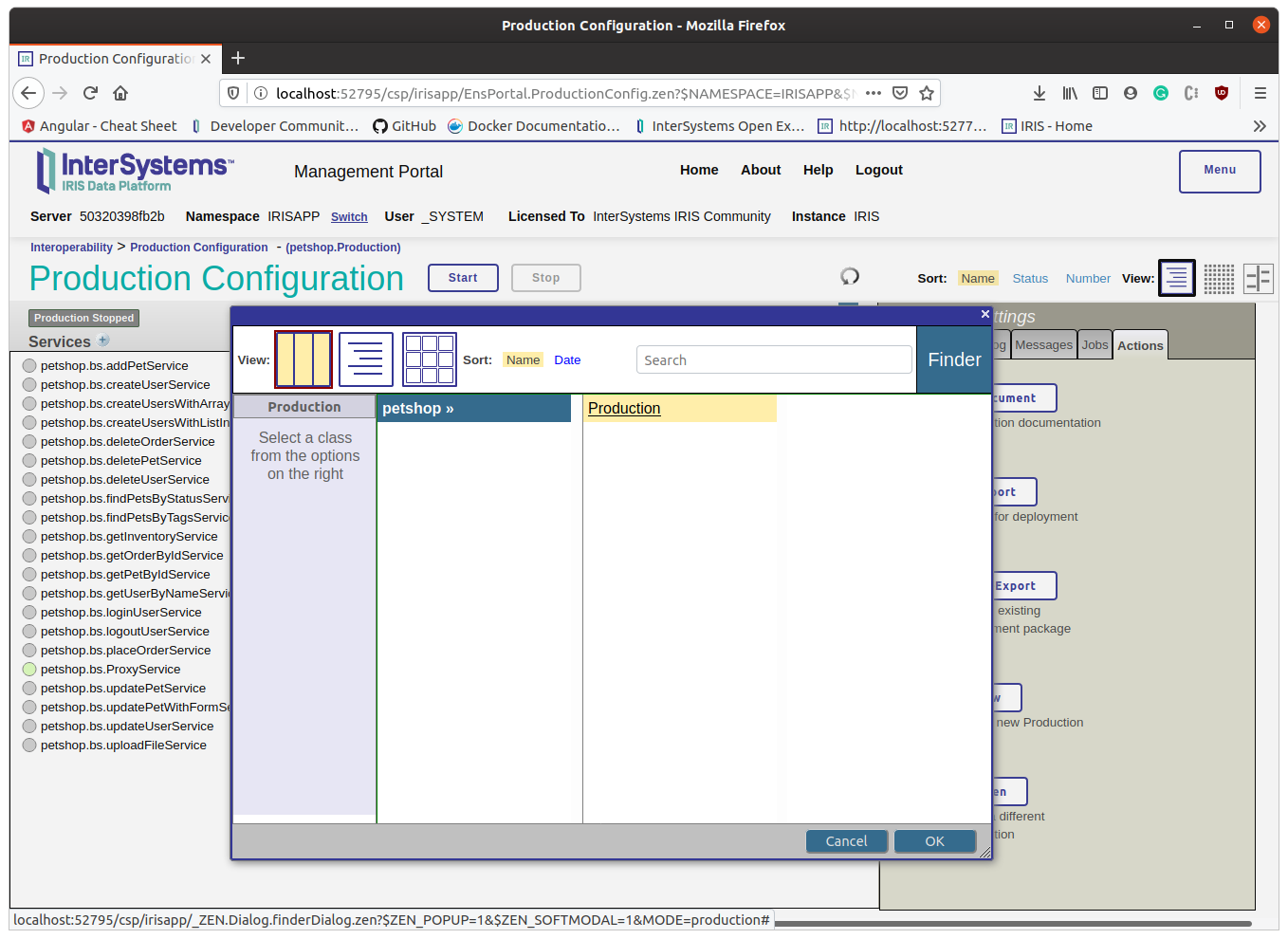
Create a pet
Change with your port number if needed:
curl --location --request POST 'http://localhost:52795/petshoprest/pet' \
--header 'Content-Type: application/json' \
--data-raw '{
  "category": {
    "id": 0,
    "name": "string"
  },
  "id" : 456789,
  "name": "Kitty_Galore",
  "photoUrls": [
    "string"
  ],
  "tags": [
    {
      "id": 0,
      "name": "string"
    }
  ],
  "status": "available"
}'
The production runs in async mode, so the rest proxy application does not wait for the response. This behavior could be edited, but usually, Interoperability production uses async mode. See the result in message viewer and visual trace
EDIT : since version 1.1.0 Rest Proxy application works in sync mode
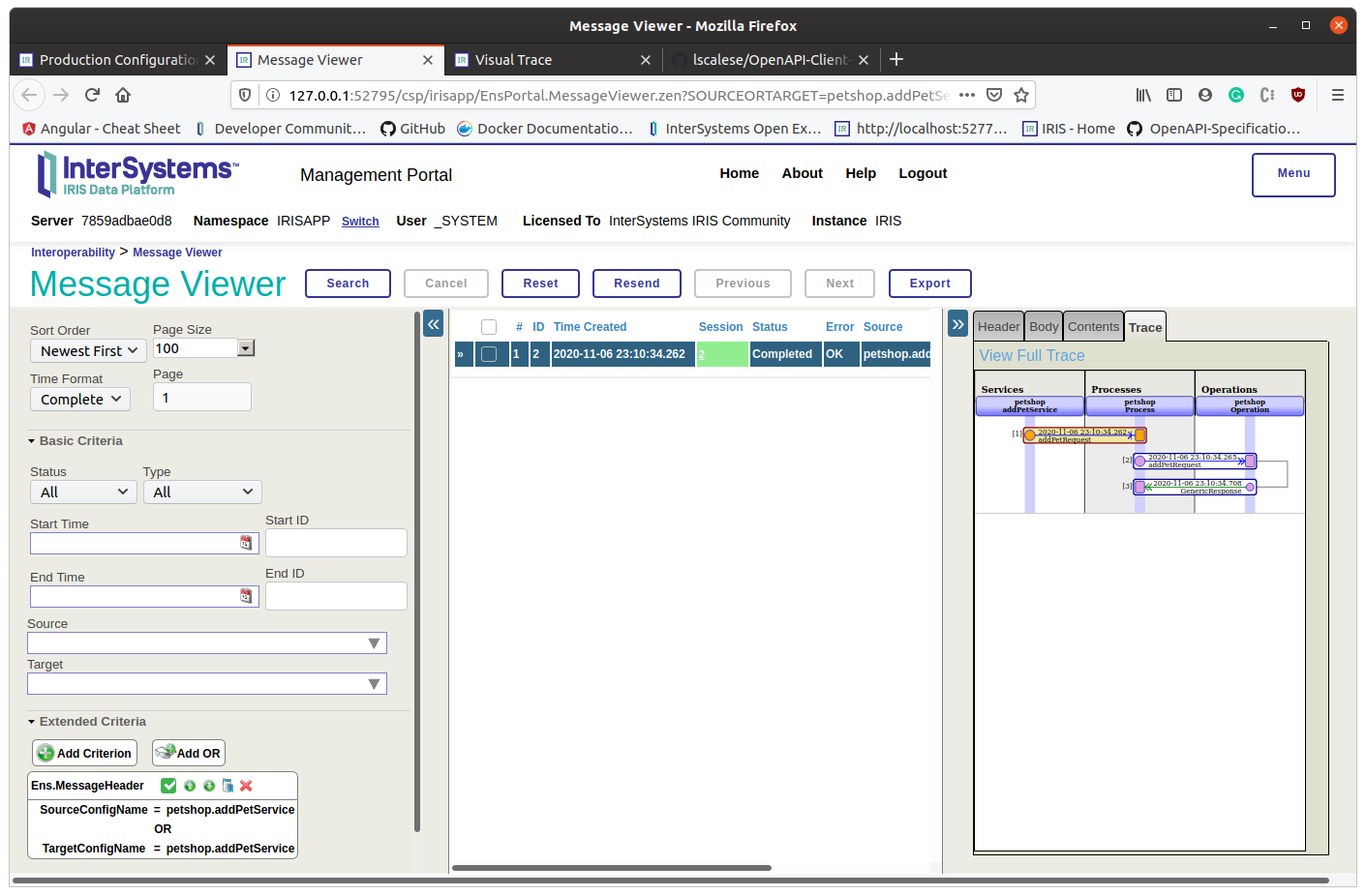
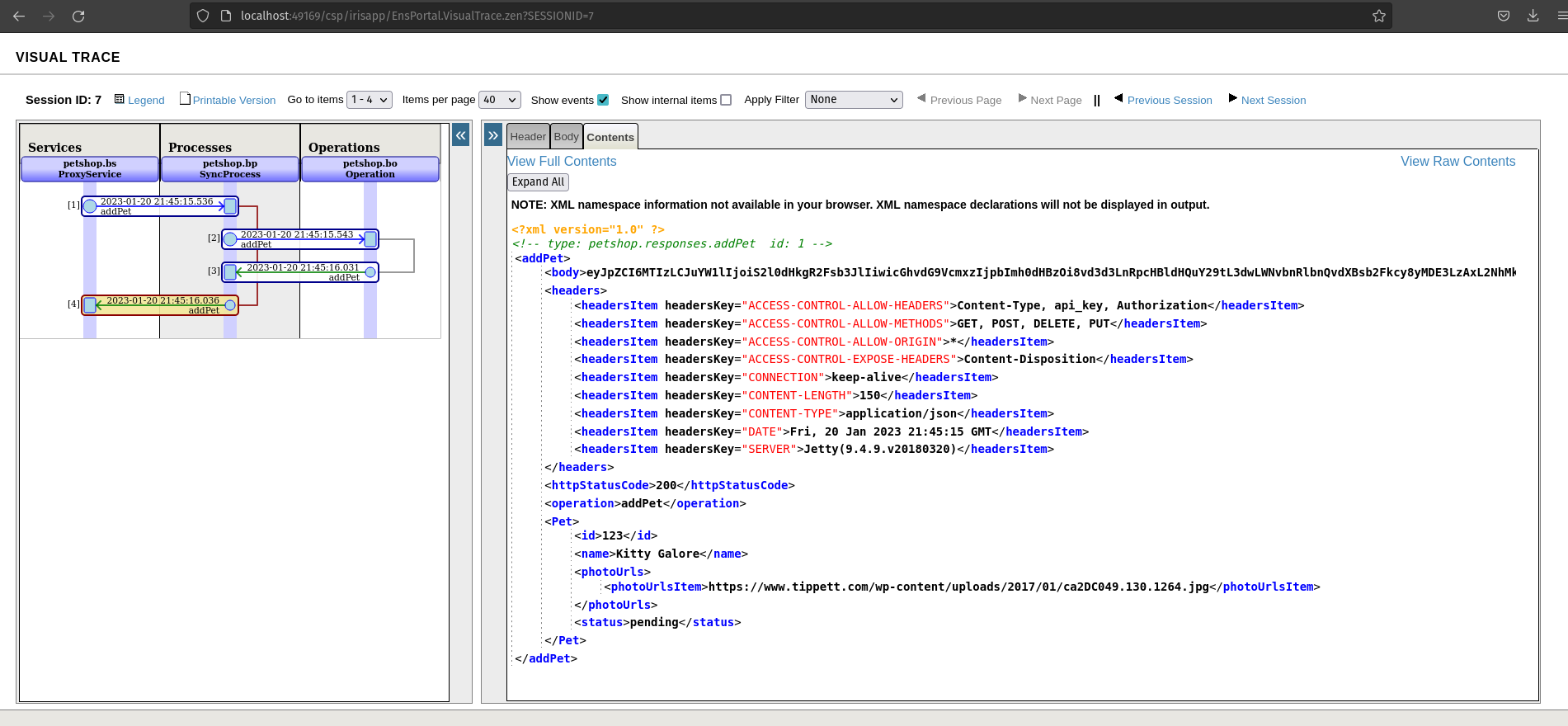 If everything is fine, we can observ an http status code 200. As you can see, we receive a body response and it's not parsed.
What does it mean?
It occurs when it's not application/json response or the Swagger specification response 200 isn't filled.
In this case, response 200 is not filled.
Get a pet
Now, try to get the created pet:
curl --location --request GET 'http://localhost:52795/petshoprest/pet/456789'
Check the visual trace :
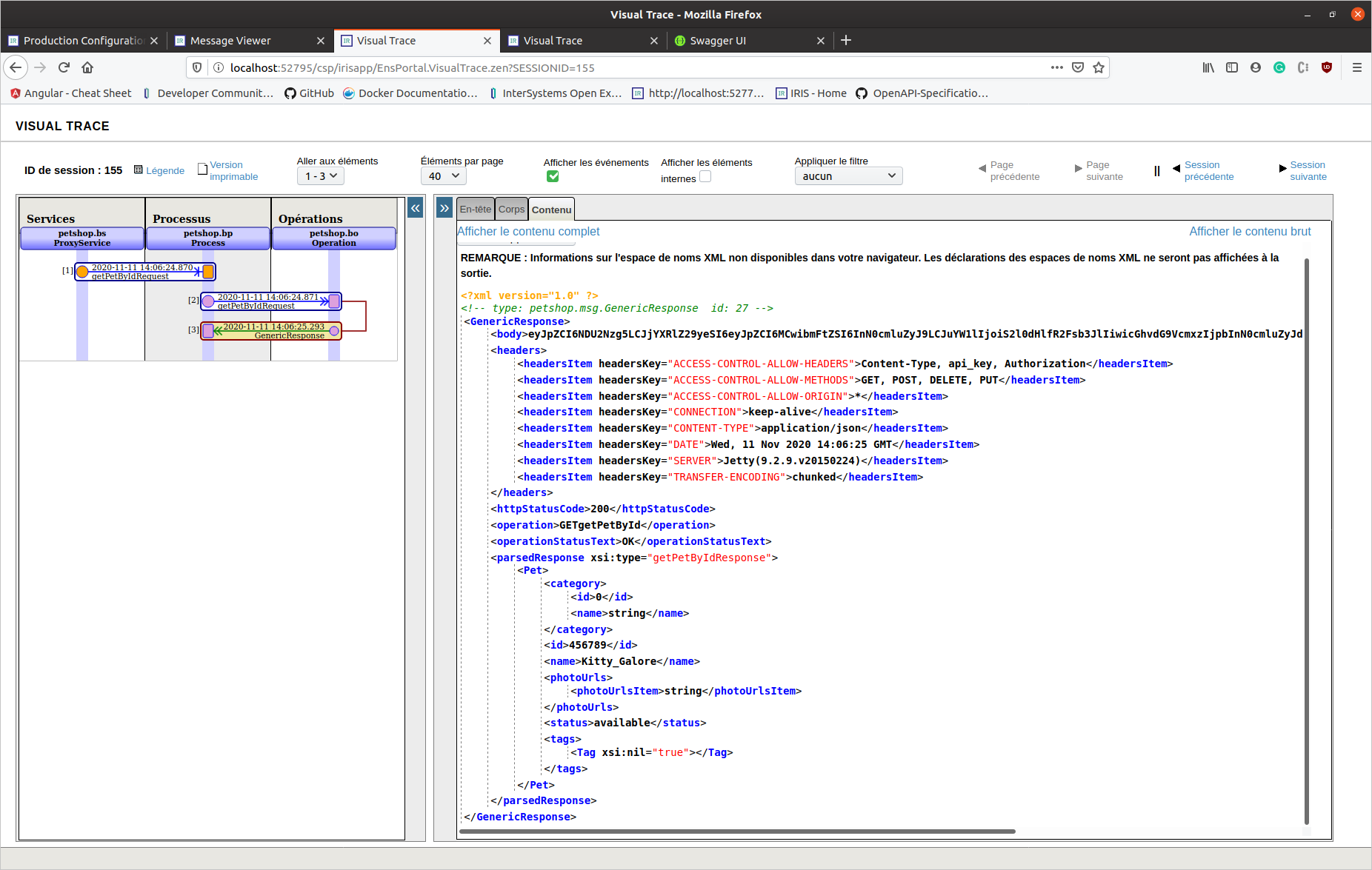 This time, this is an application/json response (response 200 is completed in Swagger spec.).
We can see a parsed response object.
### REST API - Generate And Download
This time, this is an application/json response (response 200 is completed in Swagger spec.).
We can see a parsed response object.
### REST API - Generate And Download
Also, this tool can be hosted on a server to allow users to generate and download code. A REST API and a basic form are available :
- REST API web application : /swaggerclientgen/api
- Basic form: http://localhost:52795/csp/swaggerclientgen/dc.openapi.client.api.cspdemo.cls
The generator is available online on my cloud server here.
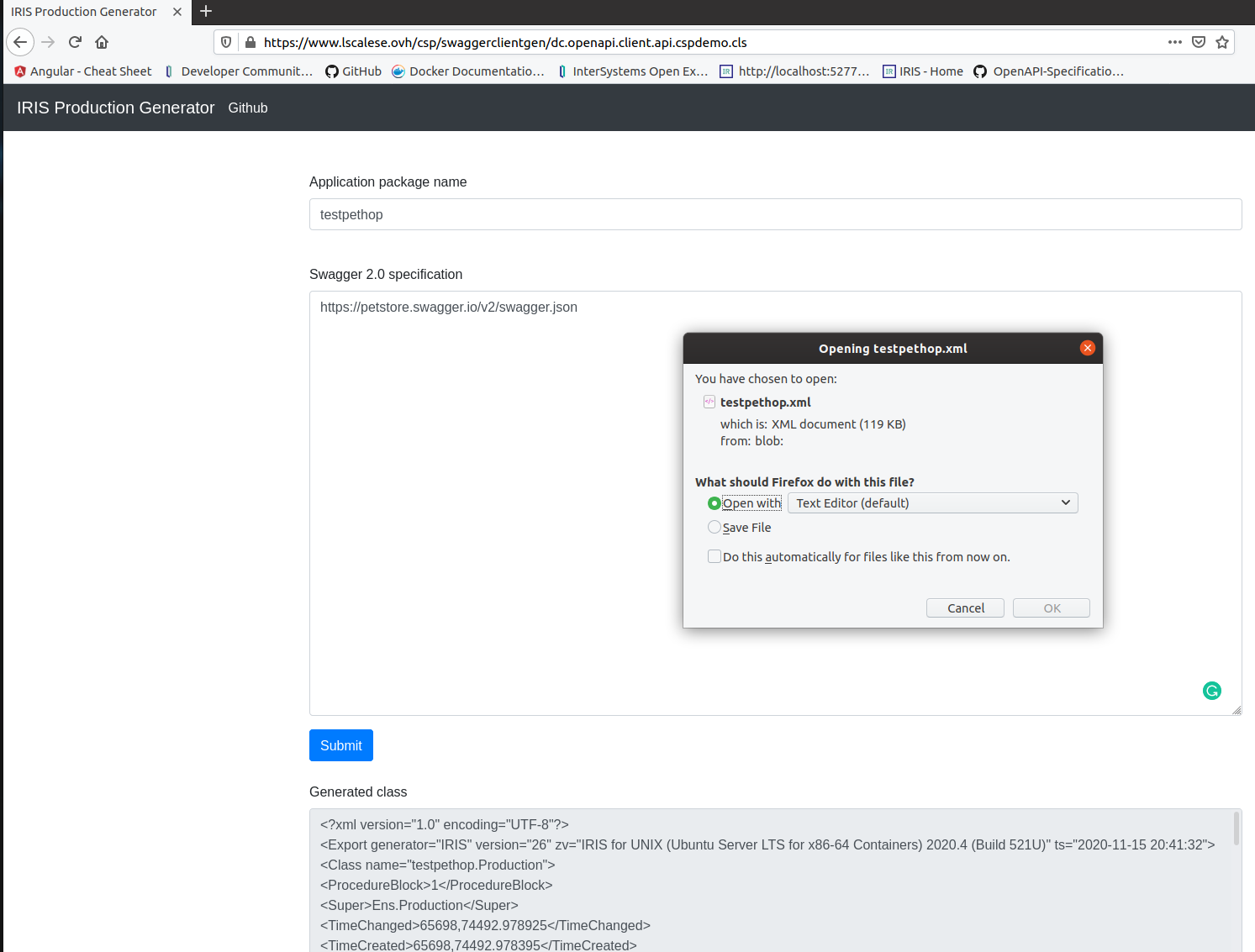
In this case, the code is simply generated without compiling, exported, and then everything is deleted.
This feature could be useful for tools centralization.
See the README.md for up-to-date infos.
Thanks for reading.

Comments
Great app to implement contract first and acelerate rest implementation in your productions.
Great app, I'll will definitely take a look, this can be very useful.
Thanks, and good luck for the contest.
Cool!
Thank you @Yuri Marx @Guillaume Rongier @Eduard Lebedyuk
@Lorenzo Scalese
Awesome application! Very useful.
Thank you @Henrique Dias !
Hi,
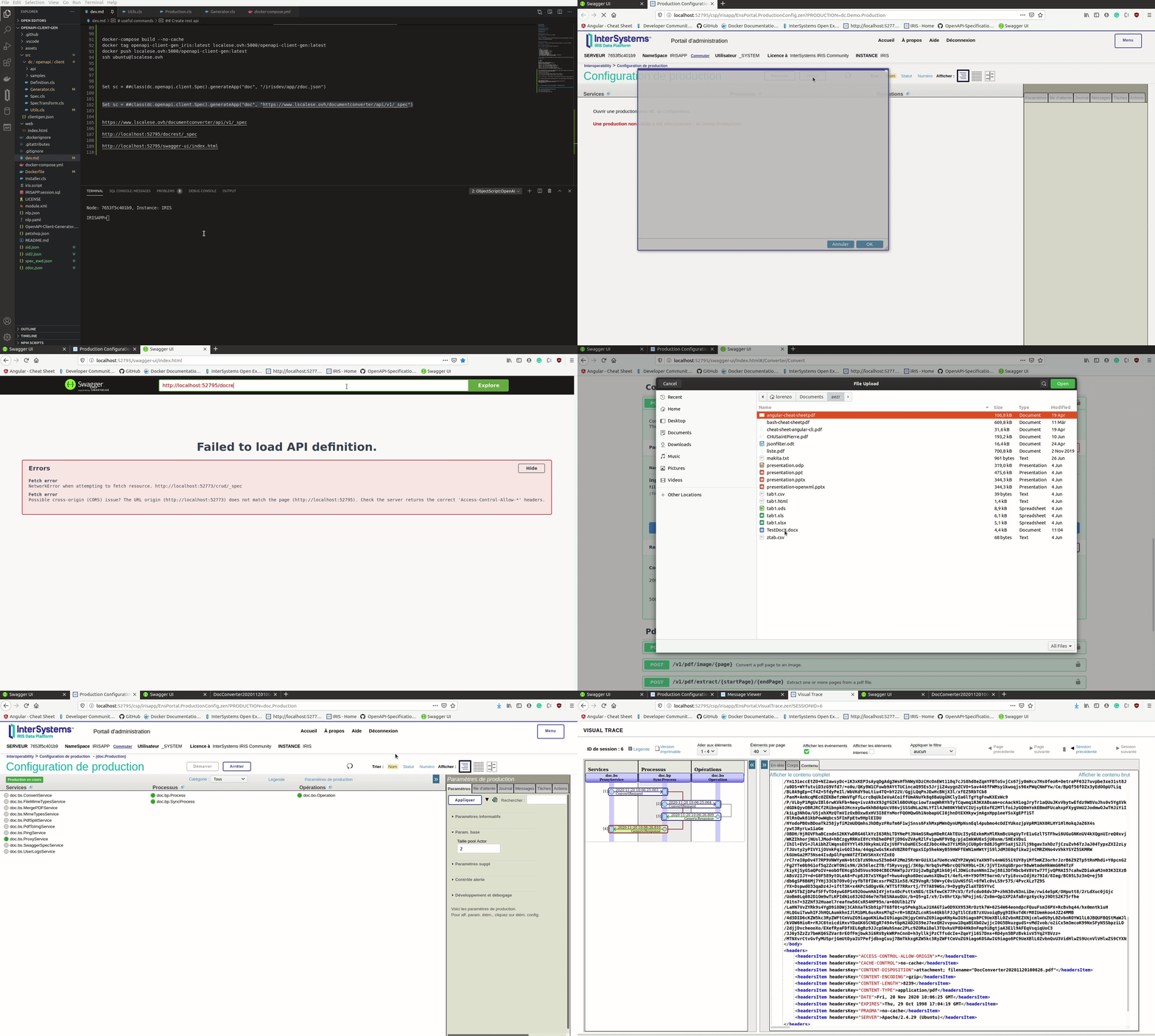
You can try my document converter with a Generated Interoperability client app.
Install the latest version (v1.3.2+)
Set sc = ##class(dc.openapi.client.Spec).generateApp("doc", "https://www.lscalese.ovh/documentconverter/api/v1/_spec")
Open Swagger tools : http://localhost:52795/swagger-ui/index.html
Explore : http://localhost:52795/docrest/_spec
see this gif video download link for full screen view

Hi @Lorenzo,
Thanks for the great tool! I tried generating a Fitbit client based on https://dev.fitbit.com/build/reference/web-api/explore/fitbit-web-api-s…, but it failed, because parameter names have "-" characters, and these cannot be part of a Property name. Therefore I extended the name() Class method to also have the "-":
ClassMethod name(name As%String) As%String [ CodeMode = expression ]
{
$Translate(name, "$_-","")
}
The proxy generation still fails, and given that I don't use that right now, I have disabled that. With these changes everything works great!
Hi @Teunis.Stolker!
Thank you very much for your feedback.
I created an issue on my github. I check this problem as soon as possible.
Hello @Theo Stolker,
The problem with the proxy generation is also due to the "-" character management. The generation fails if there is a "-" in the path parameter, ex:
/1/user/-/foods/log/water/{water-log-id}.json
This issue is fixed in version 1.4.2.
Thank you for your report !
Thanks @Lorenzo Scalese!
Hi @Lorenzo Scalese
I am trying out your app to generate a production but get the following install errors.
GHAPI>zpm "install openapi-client-gen"
[GHAPI|sslclient] Reload START (/external/config/mgr/.modules/GHAPI/sslclient/1.0.4/)
[GHAPI|sslclient] Reload SUCCESS
[sslclient] Module object refreshed.
[GHAPI|sslclient] Validate START
[GHAPI|sslclient] Validate SUCCESS
[GHAPI|sslclient] Compile START
[GHAPI|sslclient] Compile SUCCESS
[GHAPI|sslclient] Activate START
[GHAPI|sslclient] Configure START
[GHAPI|sslclient] Configure SUCCESS
[GHAPI|sslclient] Activate SUCCESS
[GHAPI|objectscript-openapi-definition] Reload START (/external/config/mgr/.modules/GHAPI/objectscript-openapi-definition/1.3.2/)
[GHAPI|objectscript-openapi-definition] Reload SUCCESS
[objectscript-openapi-definition] Module object refreshed.
[GHAPI|objectscript-openapi-definition] Validate START
[GHAPI|objectscript-openapi-definition] Validate SUCCESS
[GHAPI|objectscript-openapi-definition] Compile START
[GHAPI|objectscript-openapi-definition] Compile SUCCESS
[GHAPI|objectscript-openapi-definition] Activate START
[GHAPI|objectscript-openapi-definition] Configure START
[GHAPI|objectscript-openapi-definition] Configure SUCCESS
[GHAPI|objectscript-openapi-definition] Activate SUCCESS
[GHAPI|swagger-converter-cli] Reload START (/external/config/mgr/.modules/GHAPI/swagger-converter-cli/0.0.3/)
[GHAPI|swagger-converter-cli] requirements.txt START
[GHAPI|swagger-converter-cli] requirements.txt FAILURE
[swagger-converter-cli] Reload FAILURE
[GHAPI|swagger-validator-cli] Reload START (/external/config/mgr/.modules/GHAPI/swagger-validator-cli/0.0.4/)
[GHAPI|swagger-validator-cli] requirements.txt START
[GHAPI|swagger-validator-cli] requirements.txt FAILURE
[swagger-validator-cli] Reload FAILURE
[GHAPI|yaml-utils] Reload START (/external/config/mgr/.modules/GHAPI/yaml-utils/0.1.4/)
[GHAPI|yaml-utils] Reload SUCCESS
[yaml-utils] Module object refreshed.
[GHAPI|yaml-utils] Validate START
[GHAPI|yaml-utils] Validate SUCCESS
[GHAPI|yaml-utils] Compile START
[GHAPI|yaml-utils] Compile SUCCESS
[GHAPI|yaml-utils] Activate START
[GHAPI|yaml-utils] Configure START
[GHAPI|yaml-utils] Configure SUCCESS
[GHAPI|yaml-utils] Activate SUCCESS
ERROR! Running command returned error.
I am using IRIS for Health 2024.2 in docker container. Is your app still functional or is there some step I am missing in the install.
Thanks, Oliver James