InterSystems Open Exchange Applications Digest of May 2023
Here is a digest of new solutions and applications submitted to the InterSystems Open Exchange in May 2023.
✓ 1,096 downloads in May
✓ 728 applications all time
✓ 26,024 downloads all time
✓ 2,163 developers joined
Integrate the %UnitTest framework with VS Code
Repositório com conjunto de classes para auxiliar no desenvolvimento de integrações que consomem serviços REST
v2022.3.0
Issue with docker building was fixed.
v2022.3.1
Cubes building was changed to asynchronous
v3.1.87
- fixed horizontal scroll in pivot tables (#366)
- fixed state of exclude filters (#367)
- fixed series reset after filtering (#140)
v3.1.88
- fixed back button issue after KPI drillthrough (#291)
- for KPI drillthrough data properties filtering now disabled (#291)
- added drillthrough action to text meters (#368)
- fixed datepicker issue with horolog and timezones (#338)
- added filter state display for widgets (#369)
v3.1.89
- mdx2json endpoint now relative to dsw installation path (#379)
- fixed default color for Highcharts lines (#380)
- dev internal:
- added search component
- changed modal styles, refactored modals
- changed styles for sidebar, refactored sidebar service
- added support for navigation on sidebar keeping previous instances of component alive, this is used in the designer to be able to go back
- designer mode (#121):
- added tabs, dropdown, input with picker, file selection components to use in designer
- added designer panel and base sections
- added data source selection and widget type list for designer
v3.1.90
- fixes for mdx2json path
v3.1.92
- fixed issue with an invisible header after login
- fixed fullscreen widget position and styles. prevent resizing in fullscreen. fixed sidebar overlap
- now fullscreen mode can be activated by double-clicking on the widget header
- added new icons for widgets
- fixed issue with search on the dashboard, when searching from folder
- fixed issue with a dashboard loading spinner
- fixed styling issue with bottom padding on dashboards
- fixed issue with context menu on empty widget
- fixed "Copy MDX" and "Share" dialog styles
- changed the style of the main scrollbar on the dashboard screen
- fixed styles for dashboard editor, new components used
- fixed styles for app settings
- fixed styles for theme settings
- fixed issue when pressing menu during editing folders screen
- fixed issue with widget resizing when there is an error displayed on widget (unable to resize)
- designer mode (#121):
- added "Edit widget" context menu item
- added widget saving
- added restoring of dashboard and widget state after canceling editing
- added message if the user has unsaved changes during widget creation/editing
- added MDX generation for the edited widget
- added ability to change the data source for the edited widget
- added the ability to link widget to another
- added ability to change the widget type
- widget leaves fullscreen mode, if the "edit widget" menu item has been chosen from the context menu
- header buttons are now hidden for the edited widget
- context menu is now hidden for the edited widget
- fixed Safari styling of input with the select button
- dev internal:
- improved performance of widget rendering
- optimized widget resizing
- added
type=numericsupport for "dsw-input" component - optimized widget position and size saving
- added minimum height support for modal dialogs, refactored modal size styles
- widget list now is not using async pipe for rendering
- refactored dashboard screen class
- sidebar now can create components with single instance(used by widget editor)
v3.1.93
- fixed navigation to ZEN if dsw installed not in the root (#381)
- added widget deletion. button placed in the editor panel footer and on the widget header in editor mode (#121)
- fixed issue trying to edit/add another widget when editor already opened
- new widget size and position now generated and saved for Zen (#121)
- added validation and messages support for the editor (#121)
- added validation for widget name/datasource/reference (#121)
- dev internal:
- widget types converted to camelCase
- changed styles for non-default modal buttons
v3.1.94
- fixed issue with
donutChart3Dtype
v2023.0.6
Added final result and stop-on-error parameter when checking BI error status
v2023.0.7
bug fix
v2023.0.8
bug fix
v2023.0.9
Bug fix
v2023.0.10
Added status check and some bugs fixed
v2023.0.11
Check for dashboard existence added
v2023.0.12
renamed the method
v0.10.0
- Added support for the latest SQLAlchemy 2.0
- Added support for Alembic (migration tool)
- many bugfixes
v0.3.0
With the latest version of SQLAlchemy-IRIS, Superset can now use IRIS as a database for its own operational needs
v1.1.52
%JSON.Adaptor compatibility for parsing and dispatching
v1.1.53
%JSON.Adaptor compatibility
v1.1.54
%JSON.Adaptor prioritized over %XML.Adaptor
v1.1.55
%JSON.Adaptor prioritized over %XML.Adaptor
v1.1.56
%JSON.Adaptor prioritized over %XML.Adaptor
v1.1.57
%JSON.Adaptor prioritized over %XML.Adaptor
v1.1.58
%JSON.Adaptor compatibility
v1.1.59
bug fixes on %JON.Adaptor compatibility
v1.1.60
wizard improvements for publishing BPL-based APIs (interoperability)
v1.1.61
bug fixes & new samples for interoperability
v1.1.62
Improvements - Api's are published in the same order as the methods were implemented in the dispatch class
v1.1.63
improvements on samples classes
v1.0.1
Included classes for Phonebook and Company applications.
v3.2.24
IsCellNull remove $$$DeepSeeResultsGLVN visibility check
v3.2.25
Get all datasources
v3.2.26
Datasources
v3.2.28
New widget creation
v3.2.29
error fix
v3.2.30
Error reporting
v3.2.31
Error fix
v3.2.32
DeleteWidget
v3.2.33
Errors
v1.1.0
Automatic unit tests for dashboards and pivots introduced
v3.13.0
3.13 released on 2023-03-03 * ENH : SQL Editor : More new IRIS keywords are hightlighted, e.g. for new Windows Functions https://docs.intersystems.com/irislatest/csp/docbook/DocBook.UI.Page.cl… * ENH : SQL Editor : New code completion for “SET OPTION” * ENH : SQL Editor : New Generic CodeCompletion provider for all other databases than IRIS\CACHE e.g. MS SQL SERVER * ENH : TableViewer : Rebuild Index works now for IRIS. This is executed with %NOLOCK %NOJOURN * ENH : TableViewer : Tune Table works now for IRIS. * ENH : TableViewer : New Tune Table with %RECOMPILE_CQ: will recompile the cached query classes using the new Tune Table statistics.The new action * ENH : New Driver 3.6.1 from InterSystems IRIS 2022.2 added * FIXED: SQL Editor : Connection handling for the SQL Editor has been improved. Each SQL Editor uses only one “private” connection. * Querying the namespace objects created a second public connection. This caused the editor to open more slowly. This is now fixed. The editor now only needs one database connection. * A public connection is now only created when navigating in the server navigator. The server navigator uses its own connection, independent of any open editor. * ENH : Windows setup works now with lowest privileges. * FIXED: Scriptmanager : Scrollbars in Scriptmanager window fixed. * FIXED: ServerNavigator : Connectionhandling is now faster * ENH : Setup : Setup comes now with asigned uninstaller, so the “unknown publisher” message is gone by unstalling SQL DATA LENS * Setup can now be executed in non administrative mode * ENH : Flat Look and Feel updated to 3.0 (https://github.com/JFormDesigner/FlatLaf) * ENH : Many internal libs upgraded
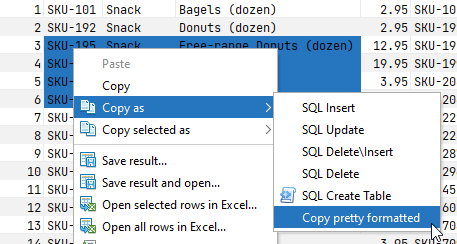
3.12 released on 2022-09-18 * ENH : SQL Editor : Min\Max\Avg\Sum values are calculated on selection in tablegrid 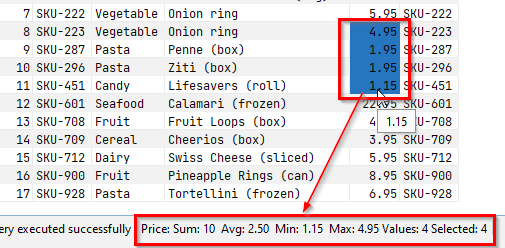 * ENH : SQL Editor : Sorting performance in grid improved * ENH : From table results the new option “Copy pretty formatted” is available
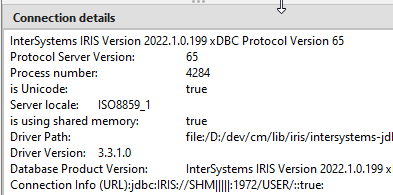
  * ENH : More visible connection details for IRIS, eg. using shared memory, server local, and more…
  * FIXED: Open TOP 1000 rows of a table produce in some situations invalid sql statement * ENH : TableViewer : Performance improvments for SQL Server connections
v1.5.1
Added the list of VSCode extension recommendations
v2.2.0
- Init support of manager
- Manager is a set of classes to help you manage and configure production directly in python
- settings.py class support
- Configure class to register
- Configure production
- Director suupport
- Start/Stop production
- Log into standard output
v2.3.0
- add support of command line
- add support of settings.py files
v1.1.3
Dockerfile simplified Swagger link is added Extensions recommendations added
v23.0.0
Changes since 22.3:
March 13, 2023
Database drivers: * A new ODBC driver was added ChatGPT: * OpenAI (ChatGPT) integration was implemented out-of-the-box in PRO versions Cloud Explorer: * Azure Cloud support was added * PostgreSQL and MySQL support was added in Azure Cloud Accessibility: * The text reader for the entity editor was improved * The text reader for the data grid was improved * Font settings are now respected in all editors/popups * Many new keyboard shortcuts were added * The catalog/schema selector now supports keyboard-only mode * Reader texts were localized Data Editor: * A few elements and behavior in Data Editor were redesigned * The issues with filtering and ordering data were fixed * The context menu was improved SQL Editor: * Query generation from human language text was added * The query execution plan was improved * Auto-completion issues were fixed Data transfer: * Data export to Google Sheets and Google Drive was added * Data export in SQL INSERT format now supports custom target table name configuration Databases: * PostgreSQL: The ability to create a full backup and SSL keys automatic conversion was added * SQL Server: VARCHAR(MAX) data type support and table column comments support were added * MongoDB: issues with running db.runCommand, JSON view and boolean values display were fixed * Teradata: multiple issues were resolved, including secure zones support and Kerberos authentication * Snowflake: Schema Compare and Table constraints reading issues were fixed * Redshift: The issue with access to Redshift Datashare was resolved
 15
15