Official way to detect differences between Environments, e.g. Preproduction and Production, in a systematic way.
Good morning
Thank you for taking the time to read this issue.
In interoperability environments, in what way is it recommended to monitor and detect changes in Web Production components between environments, for example between Pre-Production and Production, or even between alternate Nodes of Production Mirrors?
We ask this question in order to find out what are the best practices, and what is the most methodical, systematic, simple, robust and secure way to perform this monitoring.
We have thought of making a routine in Ensemble that traverses all the NameSpace of the Environment and all the Productions of that NameSpace, linking that routine to a REST Service, and consuming that REST Service through a very simple Web that shows the environments.
Specifically the REST Service we have thought to return something like this:
{
    "Namespace": "NamespaceBRAVO",
    "Productions": [
        {
            "Name": "Production.NamespaceBRAVO",
            "Status": "Executing",
            "Date": "2023-06-21 12:35:45.916"
        }
    ],
    "Components": [
        {
            "Name": "LABORATORY CHARLIE TO DELTA",
            "Type": "Service",
            "Category": "LABORATORY",
            "Port": 19000
        },
        {
            "Name": "Router CHARLIE to DELTA",
            "Type": "Process",
            "Category": "LABORATORY",
            "Port":
        },
        ...
        {
            "Name": "LABORATORY ZULU TO XRAY",
            "Type": "Operation",
            "Category": "LABORATORY",
            "Port":
        }
    ]
}
However, is there any already tested and good practice way to detect the slightest difference between Environments?
Thanks for your time reading this question and for your time answering this questions.
Greetings.
Comments
Hi Yone!
As far as I know there are no applications to compare productions (maybe I'm wrong), but It wouldn't be too hard to develop something to check it, at the end, a production is saved as any other class and you can access to the specific file of the class to compare.
Here you have an example of a production class:
Class QUINIELA.Production Extends Ens.Production [ Not ProcedureBlock ]
{

XData ProductionDefinition
{
<Production Name="QUINIELA.Production" LogGeneralTraceEvents="false">
  <Description></Description>
  <ActorPoolSize>1</ActorPoolSize>
  <Item Name="QUINIELA.BO.ImportBO" Category="" ClassName="QUINIELA.BO.ImportBO" PoolSize="5" Enabled="true" Foreground="false" Comment="" LogTraceEvents="false" Schedule="">
  </Item>
  <Item Name="QUINIELA.BP.ImportBPL" Category="" ClassName="QUINIELA.BP.ImportBPL" PoolSize="1" Enabled="true" Foreground="false" Comment="" LogTraceEvents="false" Schedule="">
  </Item>
  <Item Name="QUINIELA.BO.StatusBO" Category="" ClassName="QUINIELA.BO.StatusBO" PoolSize="1" Enabled="true" Foreground="false" Comment="" LogTraceEvents="false" Schedule="">
  </Item>
  <Item Name="QUINIELA.BS.FromWSBS" Category="" ClassName="QUINIELA.BS.FromWSBS" PoolSize="0" Enabled="true" Foreground="false" Comment="" LogTraceEvents="false" Schedule="">
  </Item>
  <Item Name="QUINIELA.BO.PrepareBO" Category="" ClassName="QUINIELA.BO.PrepareBO" PoolSize="1" Enabled="true" Foreground="false" Comment="" LogTraceEvents="false" Schedule="">
  </Item>
  <Item Name="QUINIELA.BO.TrainBO" Category="" ClassName="QUINIELA.BO.TrainBO" PoolSize="1" Enabled="true" Foreground="false" Comment="" LogTraceEvents="true" Schedule="">
  </Item>
  <Item Name="QUINIELA.BP.PrepareBP" Category="" ClassName="QUINIELA.BP.PrepareBP" PoolSize="1" Enabled="true" Foreground="false" Comment="" LogTraceEvents="false" Schedule="">
  </Item>
  <Item Name="QUINIELA.BP.TrainBP" Category="" ClassName="QUINIELA.BP.TrainBP" PoolSize="1" Enabled="true" Foreground="false" Comment="" LogTraceEvents="false" Schedule="">
  </Item>
  <Item Name="QUINIELA.BO.UtilsBO" Category="" ClassName="QUINIELA.BO.UtilsBO" PoolSize="1" Enabled="true" Foreground="false" Comment="" LogTraceEvents="true" Schedule="">
  </Item>
  <Item Name="QUINIELA.BO.MatchBO" Category="" ClassName="QUINIELA.BO.MatchBO" PoolSize="1" Enabled="true" Foreground="false" Comment="" LogTraceEvents="true" Schedule="">
  </Item>
</Production>
}

}
And here you have an example in Python to compare the content of two files. You only need to know the path in your server to access to those class files to compare.
I highly recommend using Source Control and automated CICD pipelines and restricting manual access. This is the only way to forget about this type of issues altogether.
Still, here's how you can compare code on two servers.
+1 to the Source Control recommendation
As for telling whether it's a production or test system, you might want to consider $SYSTEM.Version.SystemMode(). Calling that function with no argument will return the current system mode, which can be DEVELOPMENT, LIVE, TEST, or FAILOVER. It's usually set in the System Management Portal, but you can also call that function passing any of those strings are an argument to set it programmatically.
+1 - this is a very useful way to instrument your code.
NB : $SYSTEM.Version.SystemMode() will return a null string if it has never been assigned any mode. It is a very good practice to initialize a new IRIS instance immediately after its creation.
Furthermore, the Management Portal will tell you the current mode of your IRIS instance, which sometimes allows you to avoid handling errors by confusing your different instances.
Below you see immediately that this instance is a LIVE one :
.png)
You can also differentiate instances by downloading the browser extension I developed (IRIS WHIZ) and enabling the header colours/tab grouping
See the header colour and tab group in the screenshot below
(also circled in red but not relevant is the highlighted the erroring components section as this screenshot is from the app's Open Exchange screenshot section where I was trying to get at many features highlighted in it as possible)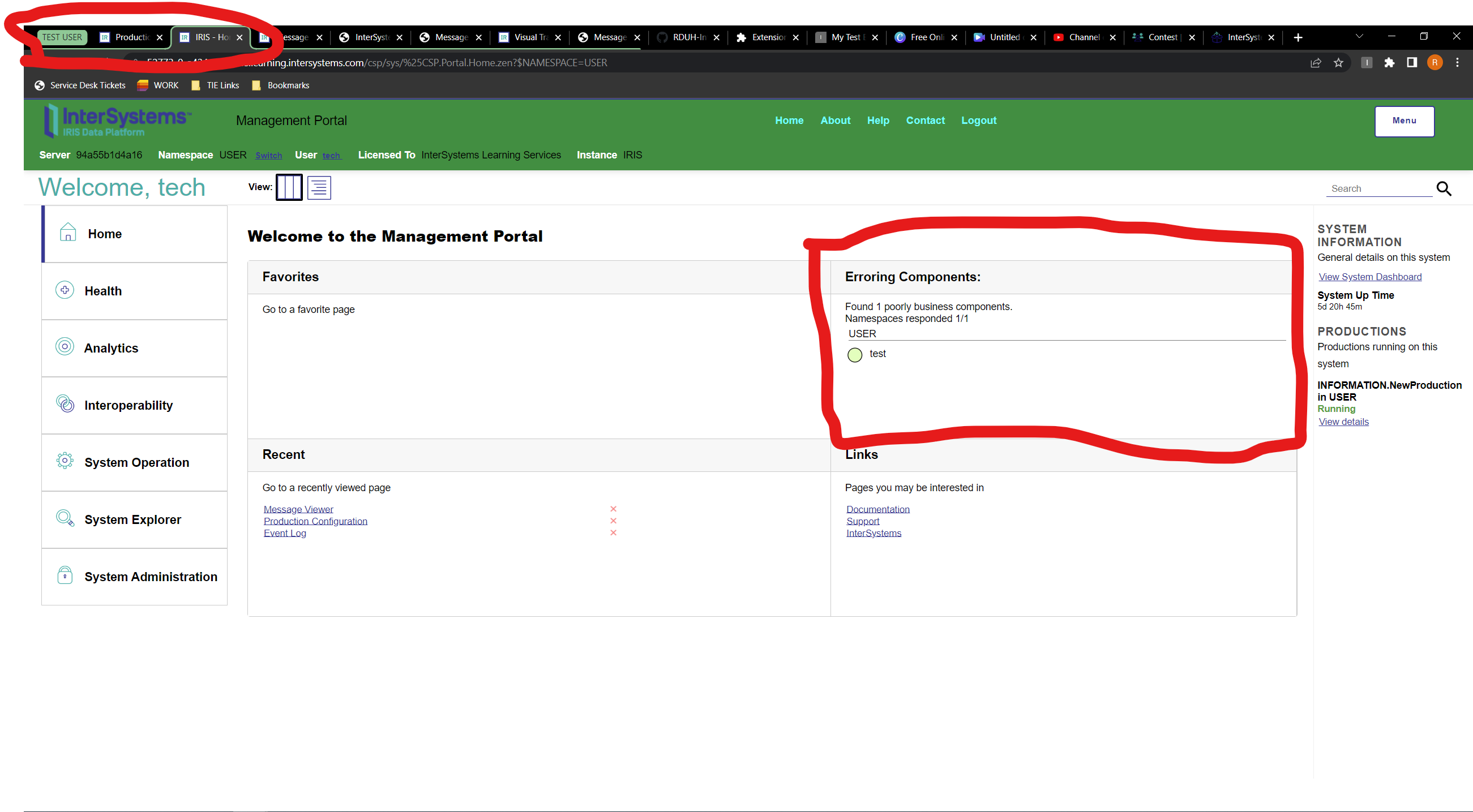
Word of warning for using this - I have had this value be reset during an upgrade on Healthconnect.
I was using this value in a function to control the output of a Transform, and I hadn't accounted for the chance of this returning null.
My code looked something like this:
ClassMethod WhatEnvAmI()
{
	Set Env = $SYSTEM.Version.SystemMode()

	If (Env = "LIVE")||(Env = "FAILOVER"){
		Quit"LIVE"
		}
	Quit"TEST"
}
So, post upgrade, the transform suddenly begun outputting values specific to the test system from the live environment.
did you report this as a bug to Support? it seems to me that this value should always persist since an upgrade shouldn't change the function of the environment
Stupidly, no.
As the default was set to "TEST" in my function, it worked fine throughout testing. Once the upgrade to Prod occurred, the issue was spotted, and the simple solution was to just reset the values. As I was moving from an adhoc to a official release, I chalked it up to that.
Next time, WRC will be getting a call 🙂
@Julian Matthews - it is never too late :) Since you know the exact version that you were upgrading from / to, I think you're in the best position to still report this as a bug to the WRC. They can then test to see if it's still an issue on the latest versions and they can log an internal bug if that is that case. I would encourage you to still take a little time and ensure it is officially logged.
Ompare - Compare side-by-side multiple disconnected IRIS / Cache systems.
https://openexchange.intersystems.com/package/ompare
This was developed in order to compare environments on different networks. It works by profiling code and configuration, across one or more namespaces, generating a signatures and optional source file to be imported into the reporting service.
The SQL Profile capability is reused to provide comparison of integration production settings across environments.
It ignores non-functional differences in code like blank lines, method / line-label order. Useful for manual integration that has occurred in different order or with different comments.
It provides reporting to show side-by-side differences of the same namespaces across multiple instances.
Has been useful for assurance environment parity, for upgrade sign-off.
Article - Using Ompare to compare CPF configuration and Scheduled Tasks between IRIS instances
https://community.intersystems.com/post/using-ompare-compare-cpf-configuration-and-scheduled-tasks-between-iris-instances
I created a lighter no-install version to compare changes in releases of IRIS versions.
/Ompare-V8 see: https://openexchange.intersystems.com/package/Ompare-V8
.png)
This deserves an article @Alex Woodhead !
One of the most effective approaches to make it happen is "Infrastructure as a code" approach. Article in Wikipedia.
So if you have your infrastructure in files and scripts you'll be able to have the difference just by comparing to github/gitlab branches. Easy like that.
Appreciate for some colleagues, there are scenarios where the ideal is not achievable for all code, application config and infrastructure config, especially where parallel work by multiple organizations operate on the same integration.
These can be Operational aspects in addition to understood Development scenarios.
Differencing can smooth the transitions for example:
* A deployment or configuration has occurred and the person responsible is not aware of Mirrored or DR environment also requiring a coordinate parallel update. Scheduled tasks come to mind.
* Upgrade may be staggered to minimize user downtime window, and app / infrastructure config may have planned gaps that need to be followed up and closed.
* There may be more than one organization and team responsible for managing, supporting and deploying updates. Where communication and documentation have not been usefully shared, cross-system comparison is good fallback to detect and comprehensively resolve the gap.
* It can help halt incompatible parallel roll-outs.
* A partial configuration deployment can be caught and reported between environments.
* Differencing can be useful between pre-upgrade and post-grade environments when applying root cause analysis for new LIVE problems, to quickly eliminate recent changes from being suspected of a problem application behavior. To allow investigation to proceed and iterate and avoid solution / upgrade rollback.
Just don't feel bad about not achieving an ideal, if have been left responsible for herding cats. There are ways to help that deployment work also.
I note the original question mentioned web production components. In the case of CSP pages, I use Ompare facility to always detect for the generated class and not the static csp source file. This will alert to cases where new csp page was deployed but manual / automatic compilation did not occur, and the app is still running the old version of the code.
Yes, I agree. I really saw InterSystems IRIS based solutions with IAC approach. But it's great to have a tool that could help! Thanks for creating and supporting it, @Alex Woodhead
💡 This question is considered a Key Question. More details here.
I asked a related question a few months ago - I'll link to answers here. There is some overlap, eg Alex Woodhead's comparison tool, but hopefully helpful. Comparing code on running servers | InterSystems Developer Community |