Sample for Beginners with Streams in IRIS
To better understand Streams in IRIS I'll start with a short
History
In the beginning (before IRIS), there was just basic access to external devices.
The 4 commands OPEN, CLOSE, READ, WRITE still work and are documented
by Introduction to I/O in detail.
Especially for files, this is a direct access to your actual file system.
You have to take care of any status or other signal in your code.
Also, any code conversion or similar is up to you.
Class %Library.File aka %File offers a large collection of methods and queries
for standard operations on directories and files.
READ, WRITE is there but the content is not touched.
Now we have reached %Stream Classes.
The major difference from before is that they are oriented to the content.
In addition, streams pass the MAXSTRING limit of 3,641,144 characters.
Streams are typed by storage location (Global, File, Tmp, Null, Dynamic)
and content (Character, Binary) and features, such as Gzip or Compressed.
The difference between file character streams and file binary streams is
that the character stream understands that it is writing character data
and this may be subject to character set translation.
In addition, line terminators for Windows and Unix are adjusted.
The example
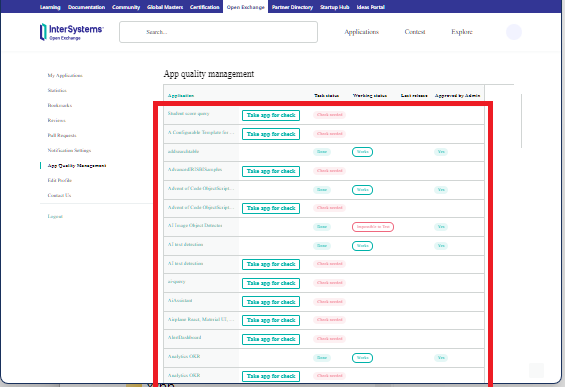
There is an HTML page with an embedded table.
The exercise is to extract all rows from the red-marked table for further processing.
embedded in this HTML page. (most likely generated with DRUPAL)
Preparation
- Call the page of interest in your browser
- with <CRTL>+S store it in a directory that can be accessed from IRIS
- in the demo this is my local directory mapped to container as /ext
- you now have a source for a %Stream.FileCharacter object.
Step 1
Set up your Stream object
set file="/ext/Stream.html" set stream=##class(%Stream.FileCharacter).%New() set sc=stream.LinkToFile(file)
Step 2
Find your table
- you can skip the HTML <head> . . . </head> part
- also the framing around the <table> . . . </table> part is just noise
- this also applies for the column headers <thead> . . . </thead>
- row content starts after the <tbody> tag
- So you search for it
Searching in streams works with the same logic as $FIND() in ObjectScript
The source to check is your stream, then a start location, and a string to find
In addition, you can switch off case sensitivity.
Remember, this is a Character stream !
set row=stream.FindAt(1,"<tbody",,1)if row<0 return '$$$OK
Step 3
Now you begin to loop over the rows.
The characteristic start is indicated in HTML by <tr . . . </tr
The class method FindAt() has the nice feature not just to provide
the location but also the remaining characters in the source buffer.
In this demo example, it always contains the full row.
Identifying the end by HTML tag </tbody is easy.
set row=stream.FindAt(row+1,"<tr",.temp,1)set txt=$piece(temp,"</tr")
Step 4
Next, the inner loop over the columns between <td .. . </td follows
As you have the complete row test in your hands, this is just normal ObjectScript
Note 1:
In the example, the content of the columns is overloaded by DRUPAlL with
a lot of formatting and other control code. So the content could only be
estimated by characteristic sequences. e.g. href=
Note 2:
To verify the result and to visualize it, I display the values and keep them
also in a PPG for further use if required. Enjoy trying it.
Demo code available on Github
Enjoy trying it.
Comments
Just a little trick, instead of:
set file="/ext/Stream.html"set stream=##class(%Stream.FileCharacter).%New()
 set sc=stream.LinkToFile(file)
You can use:
set file="/ext/Stream.html"set stream=##class(%Stream.FileCharacter).%OpenId(file)😉
Totally right!
My intention was to show it as granular as possible
to avoid eventual confusion.