What you could miss about Unicode and how it is stored in Caché
It was my answer to the question appeared in GoogleGroups. And when I answered there I figured out that it might worth to post an article and to add some light on how Unicode is stored in Caché.
The most interesting for us is in this exert from Wikipedia.
UTF-8 uses one byte for any ASCII character, all of which have the same code values in both UTF-8 and ASCII encoding, and up to four bytes for other characters.
Well, but what does it mean in practice according to Caché?
Let's try simple ASCII text
USER>set string="Test"

USER>zzdump string

0000: 54 65 73 74                                             Test
USER>write $length(string)
4
In the output from ZZDUMP, we can see single byte for each letter. Well, what if we add some text in Russian for example.
USER>set string="TestТест"

USER>zzdump string

0000: 0054 0065 0073 0074 0422 0435 0441 0442                 TestТест
USER>write $length(string)
8
Well, now we see that ZZDUMP recognized 2-bytes symbols in our text, and output all bytes in this manner.
Ok, what if we use 4-bytes character, mostly utilized in Chinese and Japanese.
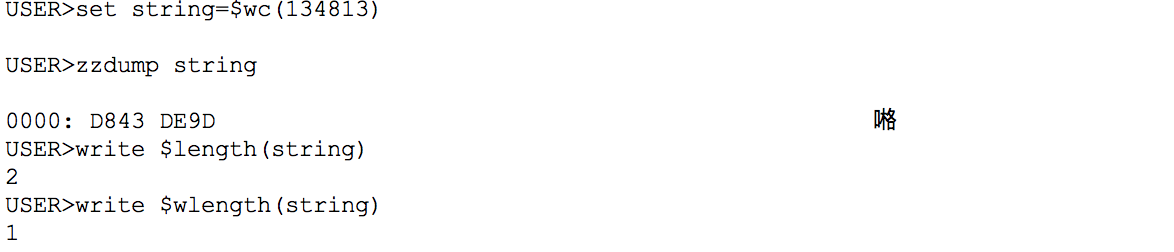
ZZDUMP shows it as two wide bytes, terminal outputs it as one symbol. And $length shows as 2 symbols here, but in this case, we should use $wlength, which recognizes such surrogate pairs.
Database
Well, we got that one character could be represented in one or more bytes. Let's see how is it stored in database
USER>zw ^A ^A(1)="Test" ^A(2)="TestТест"
Let's look inside the database with ^REPAIR tool.
Block Repair Function (Current Block 358): 1 Read Block
Block #: 357
Block # 357              Type: 8 DATA
Link Block: 0            Offset: 68
Count of Nodes: 3        Collate: 5             Big String Nodes: 0
Pointer Length:1         Next Pointer Length:0   Diff Byte:Hex 0
Pointer Reference:      ^A
Next Pointer Reference:
Next pointer stored? No

--more--

#    Node                    Data
1    ^A
2    ^A(1)                   Test
3    ^A(2)                   TestТест

Block Repair Function (Current Block 357): 8 Block Dump

Calling ^BLKDUMP
0000: 28 00 00 00 08 05 01 00 00 00 00 00 00 00 00 00         (...............
0010: 00 00 00 00 00 00 00 00 00 00 00 00 0A 00 40 80         ..............@.
0020: 41 00 00 07 0E 20 80 00 00 12 00 00 54 65 73 74         A.... ......Test
0030: 17 40 80 80 13 1E 00 00 00 03 54 65 73 74 92 30         .@........Test.0
0040: A2 B5 C1 C2 00 00 00 00 00 00 00 00 00 00 00 00         ¢µÁÂ............
0050: 00 00 00 00 00 00 00 00 00 00 00 00 00 00 00 00         ................
0060: 00 00 00 00 00 00 00 00 00 00 00 00 00 00 00 00         ................
0070: 00 00 00 00 00 00 00 00 00 00 00 00 00 00 00 00         ................
0080: 00 00 00 00 00 00 00 00 00 00 00 00 00 00 00 00         ................
0090: 00 00 00 00 00 00 00 00 00 00 00 00 00 00 00 00         ................
00A0: 00 00 00 00 00 00 00 00 00 00 00 00 00 00 00 00         ................
00B0: 00 00 00 00 00 00 00 00 00 00 00 00 00 00 00 00         ................
00C0: 00 00 00 00 00 00 00 00 00 00 00 00 00 00 00 00         ................
00D0: 00 00 00 00 00 00 00 00 00 00 00 00 00 00 00 00         ................
00E0: 00 00 00 00 00 00 00 00 00 00 00 00 00 00 00 00         ................
00F0: 00 00 00 00 00 00 00 00 00 00 00 00 00 00 00 00         ................
So, as you may notice data in ASCII is represented by in 1 byte but Unicode data in 2-bytes.
One could mean more
Let's talk about yet another thing related to Unicode: diacritical marks. It is possible that some letters in some languages have two ways to be stored in Unicode.
For example "Caché" - here the last symbol "e" have diacritical mark "´", and the symbol could be stored in different ways
USER>set string="Caché" USER>zzdump string 0000: 43 61 63 68 E9 Caché USER>write $l(string) 5
and in this way
USER>set string="Cache"_$c(769) USER>zzdump string 0000: 0043 0061 0063 0068 0065 0301 Caché USER>write $l(string) 6
As you see, the final string in output looks same but has the different length. In some cases, one letter can have more than one diacritical mark.
USER>s string=$c(97,774,771,778,769)

USER>zzdump string

0000: 0061 0306 0303 030A 0301                                ẵ̊́
USER>write $length(string)
5
Hope it helps.
Comments
Thank you for article Dmitry.
You say "you may notice data in ASCII is represented by in 1 byte but Unicode data in 2-bytes".
Actually, it seems, that Unicode data takes less then 2 bytes per character.
In your example with BLKDUMP string "TestТест" is represented as
54 65 73 74 92 30 A2 B5 C1 C2
First four bytes is clearly "Test" representation, so other four characters "Тест" are represented with just six bytes -- "92 30 A2 B5 C1 C2", instead of expected 8.
Thanks! Here's a resource I use to reference quite often: http://kunststube.net/encoding/