#Development Environment

0 Followers · 374 Posts

An integrated development environment (IDE) is a software application that provides comprehensive facilities to computer programmers for software development.

The official IDE for InterSystems Data Platform products is Atelier.

Question sween · Mar 9, 2022

We have an implementation with a bunch of users, and a bunch of namespaces, both of which are added and removed frequently, and the users have restrictive perms in the namespaces (lets just say, not %All)... and the users are utilizing the VSCODE extension for development.

Per the instructions and the user experience, we need to run:

GRANT EXECUTE ON %Library.RoutineMgr_StudioOpenDialog TO ${user}

For ... each Namespace, and additionally %SYS for Web Apps.

Is there a way to globally just make this happen "once" somewhere or is it absolutely necessary find a spot to invoke it?

4
0 400
Article Jose-Tomas Salvador · Nov 9, 2021 3m read

For some years I missed being able to offer, to everybody interested in ObjectScript, a tutorial more or less complete, to start with ObjectScript. Something that could help more and make things easier to those new developers that come to our technology... something intermediate, halfway between the common "Hello World!", that doesn't really get you further, and the "Advanced Training", that is unaffordable because of lack of time,etc.

7
0 774
Article Jose-Tomas Salvador · Dec 30, 2021 1m read

For those that, at some point, need to test what means that of ECP for horizontal escalability (computing power and/or users and processes concurrency), but they're lazy o have no much time to build the environment, configure the server nodes, etc..., I've just published in Open Exchange the app/sample OPNEx-ECP Deployment .

0
0 299
Question Ben Spead · Aug 29, 2017

I want to demonstrate using Git via Server-side Source Control hooks (to allow both Studio and Atelier to access a Shared Dev namespace), and I was planning to use the popular Caché Git hooks:

https://github.com/intersystems/cache-tort-git 

Unfortunately, when I installed and configured them I realized that they will not work in a Shared Dev configuration because those hooks rely on calling the TortoiseGit Windows executable, which means that your IDE and your Caché instance must both be running on the same machine (this doesn't make sense for Shared Dev configurations).

7
0 978
Article Laurel James (GJS) · Nov 2, 2021 1m read

We're hosting our Deltanji and Serenji user group session tomorrow - there's still time to register, if you haven't already. 

We'll be showcasing some advanced features of Deltanjiand Serenji in VS Code with time for a discussion - so feel free to bring along any problems you need help solving or share your feedback on our tools. We'd love to hear your thoughts. If you're interested in our tools this is a great chance to hear what others have to say, as well as asking your own questions.

Date: Wednesday, November 3rd

Time: 11-12pm EDT / 3-4pm GMT.

Let us know you'll be attending on Eventbrite

0
0 164
Article Ward De Backer · Oct 28, 2021 2m read

I wrote a step by step tutorial in the qewd-howtos repository how you can write state of the art multi-page web apps with Node.js using a QEWD-Up WebSocket/REST api back-end integrated with a mainstream web framework like NuxtJS & Vue.js. In particular with the latest NuxtJS/Vue.js frameworks, writing web applications becomes fun again, allowing you to write your applications very efficiently, hiding all boilerplate code from you.

The tutorial should be very easy to try out on your development machine and consists of two parts:

0
3 1201
Announcement Laurel James (GJS) · Oct 20, 2021

Hi developers,

We're hosting a User Group session for our Deltanji source control and Serenji debugger users on Wednesday, November 3rd at 11-12pm EDT / 3-4pm GMT.

We'll be showcasing some advanced features of Deltanji and Serenji in VS Code with time for a discussion - so feel free to bring along any problems you need help solving or share your feedback on our tools. We'd love to hear your thoughts. 

You can find out more on Eventbrite

Everyone is welcome. If you're interested in our tools this is a great chance to hear what others have to say, as well as asking your own questions.

0
0 149
Article Laurel James (GJS) · Oct 14, 2021 1m read

The latest release of Serenji focuses on the debug experience. Not only can you now debug on the spot, no matter where you are or what you're doing, but we've also added some smaller features that will make debugging more straightforward. 

  • Run and Debug CodeLenses - clickable links above each class method, procedure, subroutine or extrinsic function.
  • Intuitive prompting for entrypoints and arguments - when debugging a class method, produce, subroutine or extrinsic function. 
  • Shaded read-only background - to clearly differentiate between documents which are editable and those that are read-only. 
  • Program output in debug console - output is shown in the debug console. 
  • Serenji commands on Server Manager's namespace trees - allowing you to launch Serenji through Server Manager. 

Find out more in our release notes here

0
1 264
Article Laurel James (GJS) · Oct 7, 2021 1m read

Hi developers, 

We've incorporated VS Code's support for multiple concurrent debug sessions and consoles into the latest release of Serenji

So if you're working with processes that relate or are dependent on each other, you can now debug them together. Just launch a second Serenji debug session (F5) whilst the first one is still active. 

This short video below shows how it works. We hope you find this feature useful! 

Laurel 

[![Serenji 3.2 multiple concurrent debug sessions](https://res.cloudinary.com/marcomontalbano/image/upload/v1633610169/video_to_markdown/images/youtube--cs6UiAvUj24-c05b58ac6eb4c4700831b2b3070cd403.jpg)](https://youtu.be/cs6UiAvUj24 "Serenji 3.2 multiple concurrent debug sessions")
0
0 202
Article Laurel James (GJS) · Oct 5, 2021 2m read

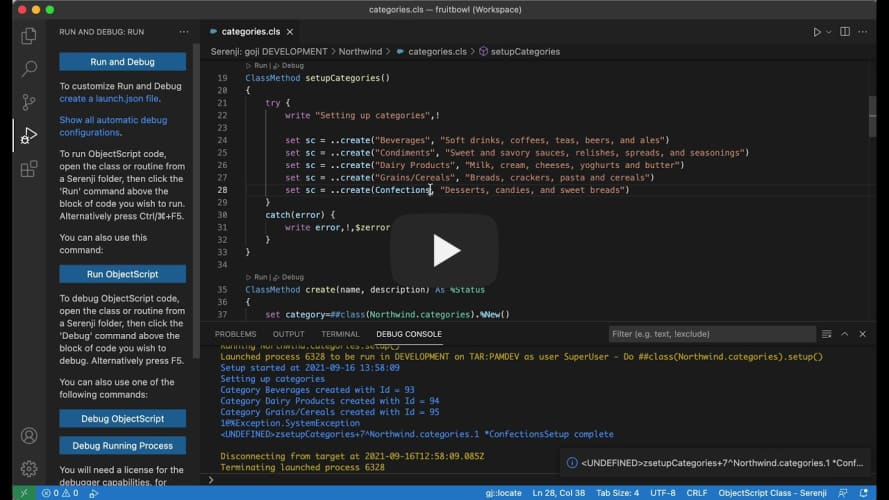
The most recent release of Serenji features our innovative gj::locate technology. It was a standalone tool we originally created for a Developer Community contest earlier this year, but we've incorporated it into our debugger after some great feedback from developers. 

It works by navigating you directly to the source of your server-side errors in just a couple of clicks - enabling you to quickly fix errors without the need to count tedious lines of code... and let's be real, who has got time for that when you're under pressure to fix this bug? 

It's simple and straightforward to use:

1. Click on the gj::locate panel in the status bar

2. Enter the ObjectScript error message or line reference from a class/.mac routine..

3. gj::locate then does the work for you by taking you straight to the corresponding line in your source code.

Easy peasy... and with time to spare to make yourself a coffee before your deadline! 

The video below shows it in action - let us know if you've already given it a go. Or, if you're interested in trying it out we offer a free 30 day trial license, just drop me a message through the Developer Community or email us at info@georgejames.com.

[![Serenji 3.2.0 utilising gj::locate technology](https://res.cloudinary.com/marcomontalbano/image/upload/v1633429904/video_to_markdown/images/youtube--r-ghc9L6xk8-c05b58ac6eb4c4700831b2b3070cd403.jpg)](https://youtu.be/r-ghc9L6xk8 "Serenji 3.2.0 utilising gj::locate technology")
0
0 213
Article Laurel James (GJS) · Sep 29, 2021 1m read

Hi developers, 

Serenji 3.2.0, the latest version from George James Software, was released last week and our current users have been enjoying trying out the new features (which you can find more about here). 

If you're thinking about trying Serenji for the first time, we've made it easier to get set up by adding a walkthrough on the VS Code Welcome page. It takes you through: 

  • Setting up the server components.
  • Selecting a server namespace.
  • Saving and extending your workspace.
  • Requesting a debug license (don't forget we offer a free 30 day trial!) 

We've also added prompts and guidance throughout VS Code to open and add Serenji folders to your workspace and when going to run and debug code. 

This is just one of the ways we've enhanced the Serenji debugger to make straightforward and easy to use - so all you need to do is focus on your code. 

[![Serenji 3.2.0 Welcome Page Walkthrough](https://res.cloudinary.com/marcomontalbano/image/upload/v1632925654/video_to_markdown/images/youtube--Obzsm9KJAQA-c05b58ac6eb4c4700831b2b3070cd403.jpg)](https://bit.ly/3odciYG "Serenji 3.2.0 Welcome Page Walkthrough")
0
0 215
Article Laurel James (GJS) · Sep 23, 2021 1m read

The latest release of Serenji by George James Software introduces zero configuration debugging, so it's ready to go in just one click - no matter where you are or what you're doing, your on-the-spot debugger is ready to go. 

We have introduced a host of new features to enhance the debugging experience so you can focus on identifying and fixing errors, without losing focus by spending time setting up a launch configuration. 

Check out the new features in our release notes

If you've already started using Serenji 3.2.0 let us know how you're getting on! 

0
2 235
Question Sai Sai · Sep 15, 2021

I want to start this project and wants to know the best practices, you guys using to arrange the project. I have done lot of mvc projects and API's in c#. But Intersystems is new to me. Please give me some suggestions like how can I Arrange the objects. Like for eg. Where can I store the productions objects like services,process and operations. will that be like under each resouces folder name? and what are the base classes, and how can I store them? basically please give me some idea about how Can I arrange them . 

Thank you 

Sai

8
0 311
Announcement Laurel James (GJS) · Aug 19, 2021

Hi developers, 

We have just published an update to the Deltanji version control extension for Visual Studio Code.

When used in certain Deltanji workflows, triggering an automatic checkout on first keystroke could result in the developer working on an outdated copy of the code and only being notified of this later when saving their changes. In order to prevent this from happening checkout now reloads the document immediately. 

Error messaging has been improved in two areas - when attempting to cancel code that is not checked out, and when trying to register new code onto a withdraw system. 

0
0 176
Announcement Dmitry Maslennikov · May 31, 2019

My extension has recently reached first 1000 installations. And thank you all of you, who use it and fill issues and even contribute to the project.

The latest version of the extension already has more not yet announced features. I'm going to make this announcement later.

Sometime ago GitHub announced their new feature - sponsoring OpenSource projects stored on GitHub.

I would like to invite you to donate to the project if you found it useful for you or just wanted to support it.

You can do it by clicking the new Sponsor button appeared on GitHub.

4
2 484
Announcement Nikita Savchenko · Jan 19, 2017

Greetings, InterSystems community!

I am pleased to announce that the web terminal project, Caché WebTerminal version 4 gets its release! After long period of enhancing this web application from 2013, it came to the version 4, which features major stability and security improvements, intelligent autocomplete and syntax highlighting, convenient SQL mode and a lot of other useful features.

The goal of this article is to spread the knowledge about this project over the InterSystems community.

34
3 3733
Announcement Laurel James (GJS) · Jun 15, 2021

gj :: locate was the entry from George James Software for the Developer Tools competition back in April 2021. When an ObjectScript error is reported, gj :: locate takes the .int line location and navigates you directly to the line in the source file where the error originated. Over the past few months we've found it a very useful tool when it comes to debugging, especially when used alongside the Serenji debugger in Visual Studio Code.

Our first update, version 1.1.0, now includes support for multi-root workspaces. This enables gj :: locate to be used with every workspace folder. If your VS Code workspace has more than one root level folder, connecting to different namespaces or perhaps different servers, then gj :: locate will determine which workspace folder is current and locate the source code in that folder. If your workspace doesn't have any files open then gj :: locate will prompt you to select a folder from a pick-list.

This will particularly benefit VS Code power users who have workspaces with simultaneous connections to multiple namespaces, on multiple different IRIS and Caché servers.

If you would like to try it out then you can download it from the VS Code marketplace. Or if you’re already a user, then gj :: locate will automatically update. Let us know how you're getting on with it!

0
1 201
Announcement Laurel James (GJS) · Jun 10, 2021

We’ve published an update to the Serenji debug extension for Visual Studio Code, making it ready for the Workplace Trust feature in VS Code 1.57.

This allows the Serenji ObjectScript editor to work without restrictions across all workspaces and, by bringing it in line with the VS Code update, only allows the debugging feature to be used in trusted workspaces.

0
1 140
Article Jose-Tomas Salvador · Apr 8, 2020 6m read

This time I want to talk about something not specific to InterSystems IRIS, but that I think is important if you want to work with Docker and your server at work is a PC or laptop with Windows 10 Pro or Enterprise.

11
3 29688
Question David Hockenbroch · May 18, 2021

 I'm trying to set up VS Code for ObjectScript using the instructions found here. I've got both Cache 2018.1.2.309.0 and IRIS 2020.1.0.215.0. When I try to connect to either one of them the connection fails, and I get a notification in the bottom right corner that says "Unexpected token < in JSON at position 0". I've checked the JSON settings file that VS Code uses, and they're fine and formatted properly. All of the settings I've entered are correct. I suspect that there's a response coming back from the server that VS Code is expecting to be JSON, but isn't. It pops up any time I click on

20
0 5881
Article Robert Cemper · Apr 26, 2021 3m read

Why SSH ?

If you do not have direct access to the server that runs your IRIS Docker container
you still may require access to the container outside "iris session" or "WebTerminal".
With an SSH terminal (PuTTY, KiTTY,.. ) you get access inside Docker, and then, depending
on your needs you run "iris session iris" or display/manipulate files directly.

Note: 
This is not meant to be the default access for the average application user
but the emergency backdoor for System Management, Support, and Development.
34
0 1188
Announcement George James · Apr 16, 2021

Announcing gj :: locate.  A simple extension for VS Code that will help you get to the source of your errors.

In VS Code, using either the Serenji extension or the basic InterSystems objectscript extension, this small add-on will open the appropriate class or routine and position you at the exact line where an error occurred.

No more tedious counting of lines to find <UNDEFINED>zCredit+206^Ledger.Invoice.1.  Instead, with gj :: locate you can get there with just a couple of clicks.

This 20 second video tells it all:


Download now and enjoy getting to the source of your errors.

2
2 283