Announcement Laurel James (GJS) · Oct 27, 2022

Hi developers!

If you missed our presentation at the InterSystems UK&I Summit and our demo during the Source Control roundtable, but you still want to find out more about source control for Interoperability Productions... there’s another chance to see it at our User Group Session next Thursday, November 3rd at 3pm (GMT)

The new driver enables highly granular management of Interoperability Productions with tight integration into the InterSystems IRIS management management portal. 

Sign up via eventbrite here >> https://bit.ly/3yqzfvS

0
0 196
Announcement Laurel James (GJS) · Oct 20, 2022

The new production component driver for Deltanji enables highly granular management of InterSystems Interoperability Productions with tight integration into the management portal. We presented it at the InterSystems UK&I summit this week and it received a great reception. 

It solves the current pain-point of Interoperability Productions being defined in a single monolithic class definition. Deltanji source control increases the granularity with which items can be managed. Instead of versioning a single class definition containing all the configuration items, this new component driver allows individual configuration items to be managed separately. Each configuration item has its own versioning and revision history and can be checked-out, checked-in, and deployed independently of any other items in the same Production.

Because each configuration item within a production class is managed by Deltanji as a first-class component in its own right, Deltanji provides all the source control, versioning, and workflow capabilities that it provides for any other component.

Watch the below clip to see it in action. 


We'll be talking about this new feature in more detail at our User Group Session on November 3rd at 3pm (GMT). Register your attendance on Eventbrite here - https://bit.ly/3yqzfvS

To find out more about Deltanji, visit our website georgejames.com or drop us an email info@georgejames.com 

13
0 357
Announcement Laurel James (GJS) · Oct 13, 2022

We’ll be hosting our bi-annual virtual User Group Session on Thursday, November 3rdat 3pm (GMT). We will demonstrate the new Production component driver for Deltanji - it enables highly granular management of Interoperability Productions with tight integration into the management portal. 

The session is also an opportunity for us to help to problem-solve any issues you're having, and a chance for you to offer your feedback on our tools.

Those interested in finding out more about Deltanji source control are welcome to join us too.

Sign up for free on Eventbrite >> https://bit.ly/3yBVYVO

0
0 278
Announcement Laurel James (GJS) · Oct 10, 2022

Introducing a new component driver for Deltanji source control, which enables highly granular management of InterSystems Interoperability Productions with tight integration into the management portal

InterSystems Interoperability Productions are defined in a single monolithic class definition. A production can contain many hundreds or thousands of configuration items. This presents a problem if multiple developers are working on different Business Processes within the same production simultaneously. Simultaneous development is almost inevitable for large productions containing many configuration items. 

0
0 193
Announcement Laurel James (GJS) · Jun 16, 2022

Only a few days to go until the Global Summit! George James Software will be on hand to talk about any projects you may have on the horizon, such as application development, data and platform migration, system integration, training, and support – we can work with you to find practical and maintainable solutions that support the growing needs of your organization. 

We're also running a User Group Session on Wednesday, July 22nd at 12pm. It's a great opportunity to find out more about our tools and ask us (and current users!) any questions. 

0
0 185
Announcement Laurel James (GJS) · Jun 13, 2022

We're looking forward to seeing everyone at the InterSystems Global Summit next week!George James Software will be there offering demos of our Deltanji source control. It has been proven to improve efficiencies within for individual developers, larger organizations, and everyone in between by bringing clarity to the development of your system. It encourages configuration management, versioning, and process control to improve the quality of your code.If you would like to find out more, look out for us in the Partner Pavilion or book in for our User Group session during lunch on Wednesday, June

0
0 245
Announcement Laurel James (GJS) · Jun 7, 2022

Come and say hi to us in the Partner Pavilion at the Global Summit! We’ll be showcasing our Serenji on-the-spot debugger which has undergone some big changes in the last year—users can now enjoy a seamless debugging experience with zero configuration, along with taking advantage of the latest features in VS Code itself, enabling users to smoothly identify and quickly fix errors in your code, contributing to the production of quality, maintainable code.If you want to see Serenji in action look for us in the Partner Pavilion, we'll be on hand to show you a demo.  Prospective users are also

0
0 230
Announcement Laurel James (GJS) · Jun 1, 2022

We’ll be at the Global Summit in June! If you’re planning on attending please come and say hi to us in the Partner Pavilion. Just a warning, our brand might look a little different from what you’re used to 👀

We’re looking forward to catching up with everyone and hearing what you’ve been up to since 2019. If you would like to book a meeting or join our User Group Session, email laurelj@georgejames.com. We hope to see you in Seattle!


0
0 195
Article Laurel James (GJS) · Nov 2, 2021 1m read

We're hosting our Deltanji and Serenji user group session tomorrow - there's still time to register, if you haven't already. 

We'll be showcasing some advanced features of Deltanjiand Serenji in VS Code with time for a discussion - so feel free to bring along any problems you need help solving or share your feedback on our tools. We'd love to hear your thoughts. If you're interested in our tools this is a great chance to hear what others have to say, as well as asking your own questions.

Date: Wednesday, November 3rd

Time: 11-12pm EDT / 3-4pm GMT.

Let us know you'll be attending on Eventbrite

0
0 164
Article Laurel James (GJS) · Oct 25, 2021 2m read

InterSystems technologies are renowned for their high performing databases, which support the systems and operations of many organisations. However a key ingredient to this success is the quality and maintainability of their code. 

The quality of code can impact everything from speed and ease of fixing bugs and making enhancements, to the overall performance of your organization and your ability to get ahead in the marketplace. 

1
1 436
Announcement Laurel James (GJS) · Oct 20, 2021

Hi developers,

We're hosting a User Group session for our Deltanji source control and Serenji debugger users on Wednesday, November 3rd at 11-12pm EDT / 3-4pm GMT.

We'll be showcasing some advanced features of Deltanji and Serenji in VS Code with time for a discussion - so feel free to bring along any problems you need help solving or share your feedback on our tools. We'd love to hear your thoughts. 

You can find out more on Eventbrite

Everyone is welcome. If you're interested in our tools this is a great chance to hear what others have to say, as well as asking your own questions.

0
0 149
Article Laurel James (GJS) · Oct 14, 2021 1m read

The latest release of Serenji focuses on the debug experience. Not only can you now debug on the spot, no matter where you are or what you're doing, but we've also added some smaller features that will make debugging more straightforward. 

  • Run and Debug CodeLenses - clickable links above each class method, procedure, subroutine or extrinsic function.
  • Intuitive prompting for entrypoints and arguments - when debugging a class method, produce, subroutine or extrinsic function. 
  • Shaded read-only background - to clearly differentiate between documents which are editable and those that are read-only. 
  • Program output in debug console - output is shown in the debug console. 
  • Serenji commands on Server Manager's namespace trees - allowing you to launch Serenji through Server Manager. 

Find out more in our release notes here

0
1 264
Article Laurel James (GJS) · Oct 7, 2021 1m read

Hi developers, 

We've incorporated VS Code's support for multiple concurrent debug sessions and consoles into the latest release of Serenji

So if you're working with processes that relate or are dependent on each other, you can now debug them together. Just launch a second Serenji debug session (F5) whilst the first one is still active. 

This short video below shows how it works. We hope you find this feature useful! 

Laurel 

[![Serenji 3.2 multiple concurrent debug sessions](https://res.cloudinary.com/marcomontalbano/image/upload/v1633610169/video_to_markdown/images/youtube--cs6UiAvUj24-c05b58ac6eb4c4700831b2b3070cd403.jpg)](https://youtu.be/cs6UiAvUj24 "Serenji 3.2 multiple concurrent debug sessions")
0
0 202
Article Laurel James (GJS) · Oct 5, 2021 2m read

The most recent release of Serenji features our innovative gj::locate technology. It was a standalone tool we originally created for a Developer Community contest earlier this year, but we've incorporated it into our debugger after some great feedback from developers. 

It works by navigating you directly to the source of your server-side errors in just a couple of clicks - enabling you to quickly fix errors without the need to count tedious lines of code... and let's be real, who has got time for that when you're under pressure to fix this bug? 

It's simple and straightforward to use:

1. Click on the gj::locate panel in the status bar

2. Enter the ObjectScript error message or line reference from a class/.mac routine..

3. gj::locate then does the work for you by taking you straight to the corresponding line in your source code.

Easy peasy... and with time to spare to make yourself a coffee before your deadline! 

The video below shows it in action - let us know if you've already given it a go. Or, if you're interested in trying it out we offer a free 30 day trial license, just drop me a message through the Developer Community or email us at info@georgejames.com.

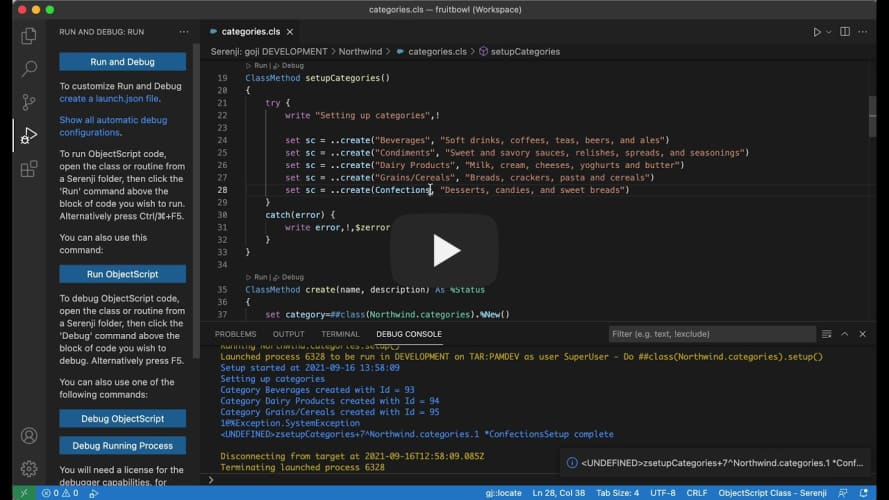
[![Serenji 3.2.0 utilising gj::locate technology](https://res.cloudinary.com/marcomontalbano/image/upload/v1633429904/video_to_markdown/images/youtube--r-ghc9L6xk8-c05b58ac6eb4c4700831b2b3070cd403.jpg)](https://youtu.be/r-ghc9L6xk8 "Serenji 3.2.0 utilising gj::locate technology")
0
0 213
Article Laurel James (GJS) · Sep 29, 2021 1m read

Hi developers, 

Serenji 3.2.0, the latest version from George James Software, was released last week and our current users have been enjoying trying out the new features (which you can find more about here). 

If you're thinking about trying Serenji for the first time, we've made it easier to get set up by adding a walkthrough on the VS Code Welcome page. It takes you through: 

  • Setting up the server components.
  • Selecting a server namespace.
  • Saving and extending your workspace.
  • Requesting a debug license (don't forget we offer a free 30 day trial!) 

We've also added prompts and guidance throughout VS Code to open and add Serenji folders to your workspace and when going to run and debug code. 

This is just one of the ways we've enhanced the Serenji debugger to make straightforward and easy to use - so all you need to do is focus on your code. 

[![Serenji 3.2.0 Welcome Page Walkthrough](https://res.cloudinary.com/marcomontalbano/image/upload/v1632925654/video_to_markdown/images/youtube--Obzsm9KJAQA-c05b58ac6eb4c4700831b2b3070cd403.jpg)](https://bit.ly/3odciYG "Serenji 3.2.0 Welcome Page Walkthrough")
0
0 215
Article Laurel James (GJS) · Sep 23, 2021 1m read

The latest release of Serenji by George James Software introduces zero configuration debugging, so it's ready to go in just one click - no matter where you are or what you're doing, your on-the-spot debugger is ready to go. 

We have introduced a host of new features to enhance the debugging experience so you can focus on identifying and fixing errors, without losing focus by spending time setting up a launch configuration. 

Check out the new features in our release notes

If you've already started using Serenji 3.2.0 let us know how you're getting on! 

0
2 235
Announcement Laurel James (GJS) · Sep 20, 2021

Hi developers, 

We're excited to let you know about the latest release of Serenji, your on-the-spot debugger from George James Software. Version 3.2.0 focuses on the debug experience and introduces zero configuration for users. No matter where you are or what you're doing, Serenji is always ready to go in just one click, so you won't lose focus by spending time setting up a launch configuration. 

1
4 372
Announcement Laurel James (GJS) · Aug 19, 2021

Hi developers, 

We have just published an update to the Deltanji version control extension for Visual Studio Code.

When used in certain Deltanji workflows, triggering an automatic checkout on first keystroke could result in the developer working on an outdated copy of the code and only being notified of this later when saving their changes. In order to prevent this from happening checkout now reloads the document immediately. 

Error messaging has been improved in two areas - when attempting to cancel code that is not checked out, and when trying to register new code onto a withdraw system. 

0
0 176
Announcement Laurel James (GJS) · Jun 15, 2021

gj :: locate was the entry from George James Software for the Developer Tools competition back in April 2021. When an ObjectScript error is reported, gj :: locate takes the .int line location and navigates you directly to the line in the source file where the error originated. Over the past few months we've found it a very useful tool when it comes to debugging, especially when used alongside the Serenji debugger in Visual Studio Code.

Our first update, version 1.1.0, now includes support for multi-root workspaces. This enables gj :: locate to be used with every workspace folder. If your VS Code workspace has more than one root level folder, connecting to different namespaces or perhaps different servers, then gj :: locate will determine which workspace folder is current and locate the source code in that folder. If your workspace doesn't have any files open then gj :: locate will prompt you to select a folder from a pick-list.

This will particularly benefit VS Code power users who have workspaces with simultaneous connections to multiple namespaces, on multiple different IRIS and Caché servers.

If you would like to try it out then you can download it from the VS Code marketplace. Or if you’re already a user, then gj :: locate will automatically update. Let us know how you're getting on with it!

0
1 201
Announcement Laurel James (GJS) · Jun 10, 2021

We’ve published an update to the Serenji debug extension for Visual Studio Code, making it ready for the Workplace Trust feature in VS Code 1.57.

This allows the Serenji ObjectScript editor to work without restrictions across all workspaces and, by bringing it in line with the VS Code update, only allows the debugging feature to be used in trusted workspaces.

0
1 140
Article Laurel James (GJS) · Apr 20, 2021 3m read

You may think it isn’t too difficult to get from label+offset^routine to the actual source line responsible for the error.  For an expert it isn't that hard... most of the time.  But there are enough oddities and special rules that even an expert can get it wrong, whilst spending a lot of time trying to get there.

gj :: locate is the latest tool from George James Software – it debugs any error, class or routine by converting the location of an error in compiled .int code to the corresponding location in your source, and then taking you right there.

Image this scenario…

0
1 279