I entered the irissession SERVER command and got the prompt PROMPT>
Now I want to exit this and return to the generic aix prompt $
I try q, quit, e, exit... none of these work.
Posts that relate to discussions on utilizing the Terminal tool.
I entered the irissession SERVER command and got the prompt PROMPT>
Now I want to exit this and return to the generic aix prompt $
I try q, quit, e, exit... none of these work.
Hello everyone, I'm trying to run a cache terminal script from cmd/ batch.
I run it like this C:\MyCache\bin#cterm.exe C:\Users\Me\Desktop\cache_scrip.scr
The command opens a terminal, but nothing happens, no title present, no log file written, no output, it's just stucked.
Here is my script:
Could be enabled a service as "%service_telnet" from cmd? I need to open a cache terminal from cmd but without this service enabled it is not possible, I mean avoiding the use of manage portal of course.
Dear experts,
Can you give tips to solve this issue?
When I try start cache is recording this error message in cconsole.log:
01/31/22-14:11:28:143 (4516) 3 Error: <DIRECTORY>SYSTEM+4^%ZSTART running %ZSTART - Logins are disabled
I try acess terminal and management portal, but are disable because that error.
I dont know how can I enable the logins.
Hi everyone,
Im trying configure the Caché Monitor Manager (^MONMGR) utility for send alert e-mails.
Following the steps I have doubs to configure the options in "Set Server" to send e-mails for hotmail or outlook (smtp-mail.outlook.com).
I dont know how can I configure Mail server SSLConfiguration for hotmail or outlook.
Could you give me help?
Thank you! 
Mail server? mail.outlook.com (Enter '-' to reset) =>
Mail server port? 587 =>
Mail server SSLConfiguration?
Mail server UseSTARTTLS? 0 =>
Hi Everyone,
Has anyone tried to write down a function in a routine that list all of possible function inside the routine? I can only think of iterating through the routine line one by one and differentiate between function and function definition. Is there any existing function that can be utilised? I think it should work similar to how
do function^routineName
works. I could not find the source for how "do" works, but I believe do will look at the list of function in the routine, and if it finds it, it will call the function, but if it does not find it, it will give an error?
If I open a terminal and type the following commands, sc is an error:
set validator = "sc = ##class(%Library.Numeric).IsValid(""BLAH"")"
set @validator
write sc
At the end, when I write sc I get:
0 L'BLAH9
             DOCXT010,#e^zIsValid+1^%Library.Numeric.1^1e^^^1
However, if I call the following class method using the arguments "%Library.Numeric" and "BLAH", sc is undefined
ClassMethod testvalidator(class As %String, value As %String) As %Status{set validator = "sc = ##class("_class_").IsValid("""_value_""")"write validator,!set @validatorwrite sc,!quit sc}I am writing a report for a client that will create a report of the current process with a format that mimicks the Management Portal process display. I am writing a cterm script file to generate the report.
In the loop that process the results I am writing the columns in a formatted manner that will result in a CSV format very similar in content and order the process page. However, it appears that the write statement is limited in size such that I can not write out all of the elements of the sys.process query. My query result processing that works correctly is of this format:
New to IRIS. Installed docker container as per instructions. From my system I run:
# docker exec -it iris bash
and then try to start a terminal session, which fails
irisowner@2f54ebfbc52f:~$ irissession IRIS
<NOTOPEN>
How do I successfully start a terminal session?
It's possible to enable Ctrl+C / Ctrl+V in IRIS Terminal for Windows.
To do that, open Terminal and select Edit > User Settings and enable Windows edit accelerators. This settingspecifies whether the Terminal enables the common Windows edit shortcuts (Ctrl+C, Ctrl+V, Ctrl+Shift+V), in addition to the basic Terminal edit shortcuts (Ctrl+Insert and Shift+Insert).
After that Ctrl+C / Ctrl+V would work.
Also <SYNTAX> errors after incorrect copy/paste go away.
Docs.
Hi,
I am getting following error while executing the below command in terminal
>install iris-analytics-sample
ERROR #5001: 'iris-analytics-sample' not found in any repository.
However if I type full command then it is working fine.
Thanks
Greetings, InterSystems community!
I am pleased to announce that the web terminal project, Caché WebTerminal version 4 gets its release! After long period of enhancing this web application from 2013, it came to the version 4, which features major stability and security improvements, intelligent autocomplete and syntax highlighting, convenient SQL mode and a lot of other useful features.
The goal of this article is to spread the knowledge about this project over the InterSystems community.
If you do not have direct access to the server that runs your IRIS Docker container
you still may require access to the container outside "iris session" or "WebTerminal".
With an SSH terminal (PuTTY, KiTTY,.. ) you get access inside Docker, and then, depending
on your needs you run "iris session iris" or display/manipulate files directly.
Hi guys,
I've created an iris command line utility to interface the Linux command line with Interface IRIS
https://github.com/RamSailopal/iriscmd
It maybe of use to some of the community
Ram
Hello, developers!
I would like to share the history of the project - the ZAPM shell.
As soon as ZPM was implemented, I immediately began to think about how best to use it.
And immediately faced with the desire to move more quickly between namespaces, especially when there are more than 20 of them. I had to leave the ZPM, move to the desired namespace and re-enter the shell. I suggested an improvement - a new "namespace" command for easier navigation. I didn’t wait - I did it myself. And so it went. If you need it, get ready to do it yourself.
We've our Cache running on Windows 2012 Server, but I've a Macbook Pro. Earlier I was using Miscrosoft Remote Desktop 8, to remote into our Windows server & everything worked.
Since version 8 is discontinued, I installed Microsoft Remote Desktop 10.5, which works for everything except starting Terminal.
I get error 'NTI Connection Error'
(287) Error writing to Pipe
Reason: (998) Invalid Access to Memory Location.
If I do remote desktop from Windows machine (using same credentials), it works.
Hi
Has anyone found a good terminal emulator replacement for Cache Terminal?
We want one where the up arrow works to bring back the last command typed (without extraneous characters appearing at the beginning of the line) and be able to run D ^JOURNAL and have it display correctly.
I tried WebTerminal a couple of years back and but it didn't work properly with the journal. I've tried RoyalTS and that doesn't do up arrow or the journal correctly even though it's supposed to be emulating a VT400.
Any suggestions?
thanks
version cache for windows, 2017.2.1 build 801_3 - windows 10
I had this system set up for 3+ years now, and background tasks such as converting emails, have always worked, suddenly it's stopped working and I've tracked it down to any network references.
reading the emails, I look for any attachment files, and save them to a network drive before processing them within a class method,
I've been testing it by sending exactly the same email repeatedly and checking the saving of the attached file in both the background and in the terminal.
Hello!
I have installed windows 10 and cache 2018.1.0.184.0
I run terminal not from cache cube but through localDemon.exe (for report outputting from my programs to excel).
All worked fine but after some time error occured "Cannot load supporting modules" (in attached file) and localDemon.exe is not launching.
But terminal from cache cube is still launching without problems (but from it reports are not working, localDemon.exe is required)
I thought it is windows defender or antivirus put some localDemon.exe module to quarantine but quarantine is empty.
In Cache for Windows (x86-64) 2018.1.3 (Build 414U) I found something very useful
Hi Developers
Is there any way that we can pass the values to the read prompts via cache routine.
For example, we have a couple of reports/routine in our system which accepts some inputs and after taking the inputs it generates some data. Right now it has proper UI and where User enters the value and in routines we have Read statements which accepts those inputs for further processing.
Let's say I have this simple script file try.script
write 1
write 0
I can execute it in a terminal (csession) by calling:
csession cache < try.script
And I get the following output:
%SYS>
1
%SYS>
0
However I want to use a try catch block in my script:
try {
write 1/0
catch {}
halt
But as script is executed line by line, it's interpreted like this:
%SYS>
TRY {
      ^
<SYNTAX>
%SYS>

WRITE 1/0
^
<DIVIDE>
%SYS>

CATCH {}
^
<SYNTAX>
%SYS>
I know that I can write it all in 1 line, but I'd rather not do that. Is there a way to feed multiline statement into Cache?
New to InterSystems products? Looking for tips and tricks for using the Terminal? Check out the latest video from Online Learning: Using the InterSystems Terminal.
I try to run a small test routine (guessing a random number) in WebTerminal but the result looks broken.
in IRISterminal:
in WebTerminal:
I think it relates to backspace.
Is there some special setting required?
The code:
a
s q=".......... guess [0..9]: "
f i=1:1 d b if p w ! w $c(9),"thank you",! q
q
b
w !,i,$c(9),q
f r v#1 q:(v?.1n) w " !no number",$c(8,8,8,8,8,8,8,8,8,8,8,8)
w " "
s r=$R(10),p=$s(v="":1,v=r:"!",v>r:"<",1:">")
s x=q,$e(x,r+1)="*",$e(x,v+1)=$s(v=r:"!",v>r:"<",1:">")
q:p w $c(13),$c(9),x s p=v=r q
Hi, folks!
Do you know the option/mode when I can feed multiline code into a terminal?
E.g.
for i=1:1:100 {

/// do one line

///do something else}In the default IRISterminal or using PuTTY I have a set of "Routine Commands" available
Running WebTerminal from OpenExchange over HTTPS could be a very secure access method for remote developers.
So I was asked to compare it to other access tools.
One of the tests was display speed. So from the command prompt, I did a simple ZWRITE ^SYS
I started it in parallel: WebTerminal, IRISterminal, Putty
- PuTTY completed first, though started last
- IRISterminal took some time longer but ended somewhat later
- WebTerminal first chopped the output but was then incredibly slow.
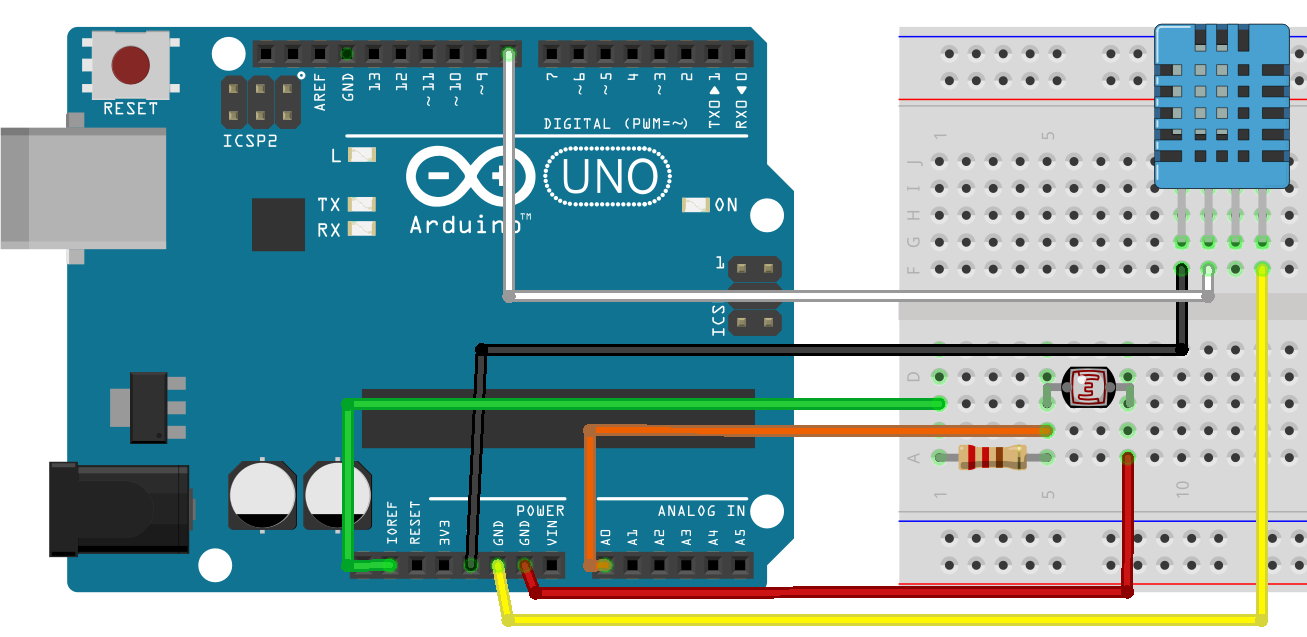
It was InterSystems hackathon time and our team, consisting of Artem Viznyuk and me had Arduino board (one) and various parts of it (in overabundance). And so like that our course of action was set - like all other Arduino beginners, we decided to build a weather station. But with data persistent storage in Caché and visualization in DeepSee!
Hi folks!
When I start IRIS in docker every time I do the following:
$ docker-compose up -d --build

$ docker-compose exec iris iris session iris

USER>zn "NAMESPACEINEED"
Is it possible to have an open terminal command connect to a particular namespace?
Simple problem:
Is there any way to force terminal to the foreground after current command ends?
This is Windows with cterm/iristerm although Putty/Kitty solution would also be nice.